

A sensor project becomes more useful when you can ask what happened before you looked at the display. But an endlessly growing text file brings a new problem: eventually the history consumes the storage. Deleting the old file first brings another: a failed replacement can leave you with no history at all.
Build a small experiment log that keeps the most recent 1,000 records. It stores a failed reading as an error, preserves a real zero as a number, and adds the new record and removes the oldest record in one transaction. A transaction is a group of database changes that are committed together or rolled back together. We deliberately begin with synthetic readings so every expected result is reproducible before connecting a sensor.
Verification: the supplied program has been exercised against real SQLite files on the development computer, including a deliberately terminated process and injected database failures. It has not been run on a Raspberry Pi here, and no SD-card endurance, sudden power-loss or physical sensor test is claimed. The demo numbers are generated examples, not measurements.
The computer and the job of each part
The named target is a Raspberry Pi 4 Model B running Raspberry Pi OS 64-bit and CPython 3.11 or later, the standard Python implementation. This is a Linux computer, not a Pico microcontroller. The program uses Python’s standard library only. SQLite is the database engine embedded in that library; it stores the tables in a local file without a separate database server.
| Part | Purpose in this experiment |
|---|---|
| Raspberry Pi 4 Model B | Runs the command-line program and manages the local filesystem. |
| Suitable regulated USB-C supply for Pi 4, 5.1 V / 3 A | Powers the computer through its normal power connector. Follow the exact supply and board documentation; the current rating is capacity, not a constant current forced into the Pi. |
| microSD with Raspberry Pi OS and free space | Holds the operating system and our dedicated experiment database. Retaining fewer rows does not remove the need for free space or backups. |
| Keyboard/display or an already configured terminal connection | Lets you run the commands and inspect their output. |
| bounded_log.py | Checks inputs, saves records and applies the retention rule. |
No sensor wiring is required for this storage experiment. Leave all general-purpose input/output (GPIO) header pins unused. The USB-C power connection is not an instruction to put 5 V on a GPIO input. If you later attach a sensor, its power, signal levels and driver remain a separate design that must be checked for that exact board. Raspberry Pi’s hardware documentation gives the power recommendations.
Follow one record through the log
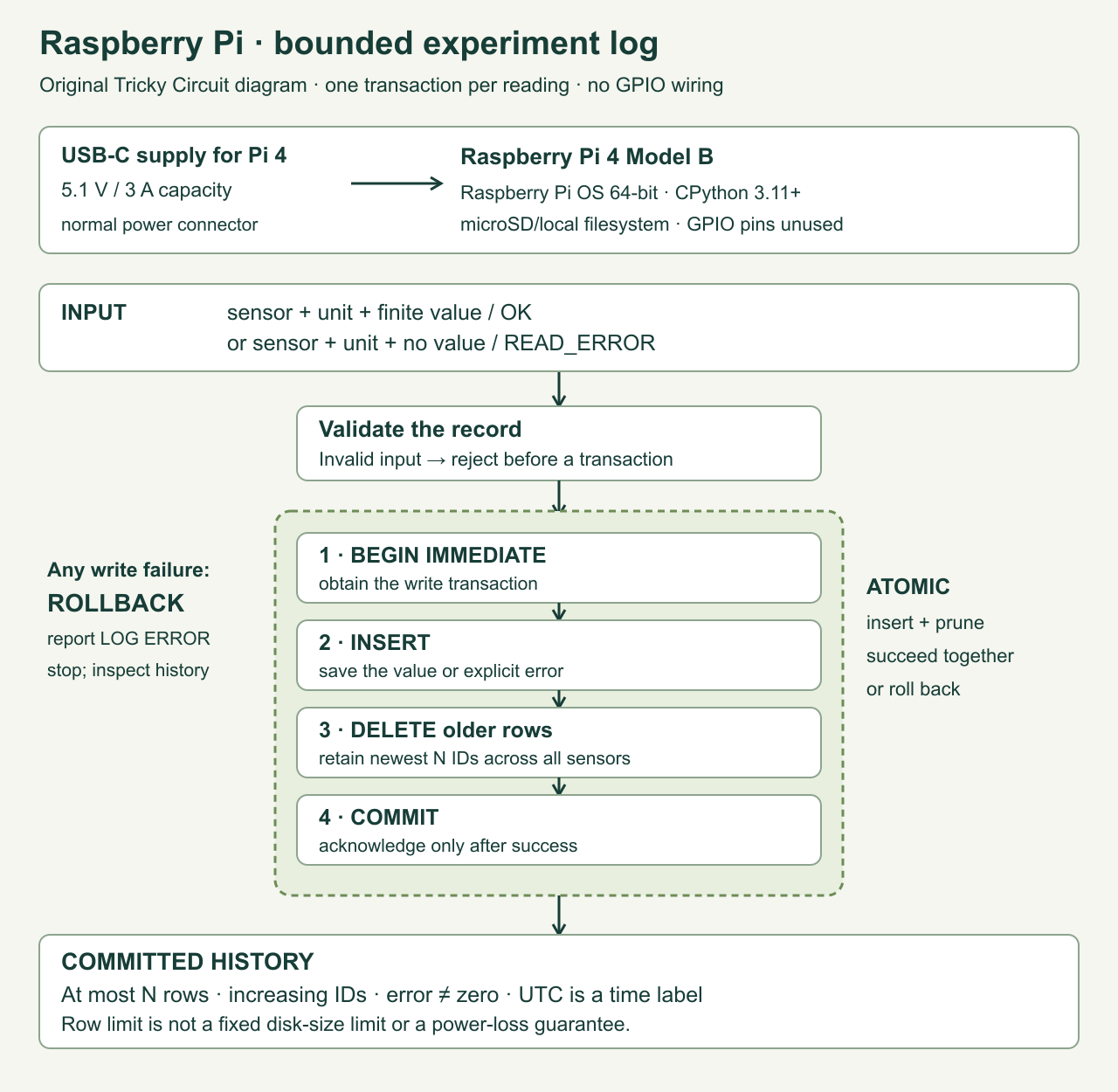
Each row has an increasing id, an arrival-time label in Coordinated Universal Time (UTC), a sensor name, a unit, a value and a status. For example, room / degC / 0.0 / OK means a valid zero degrees Celsius. room / degC / null / READ_ERROR means the acquisition failed. null means no numeric value was recorded. Never replace it with zero just to make graphing easier.
Our contract accepts OK only with a finite number between −1 billion and +1 billion; booleans are rejected even though Python can treat them as integers. That wide bound limits our data format. It does not certify that a temperature or voltage is physically plausible. The acquisition code must perform the sensor-specific range and error checks. Sensor and unit names use letters A–Z or a–z, digits, underscores and hyphens: for example, bench_supply, V and degC.
The record ID defines arrival order. It is not a sensor sequence number or a precise clock. The computer’s wall clock can jump when time is corrected, so sorting by timestamps could evict the wrong record. SQLite’s AUTOINCREMENT mechanism gives our committed rows increasing IDs without reusing deleted committed IDs; gaps are allowed. Resetting or replacing the entire database starts a different history.
The five write steps are: request the writer lock, insert one row, find the first row outside the newest N, remove that row and anything older, then commit. SQL, or Structured Query Language, expresses those database operations. The values are bound as parameters, not assembled into an SQL command from input text. The program explicitly controls the transaction through the Python sqlite3 interface.
How much history does 1,000 records represent?
N counts all rows together, including error rows and every sensor. If one channel produces a record every Δt seconds, the oldest-to-newest span of a full log is approximately (N − 1) × Δt, assuming regular arrivals. At one record per second, 1,000 records span 999 seconds: 16 minutes 39 seconds. At one record every 10 seconds, the span is 9,990 seconds: 2 hours 46 minutes 30 seconds.
Four channels sampled once per second produce four rows per second, so 1,000 rows cover roughly 250 seconds of sample groups. A noisy sensor that reports many errors can displace other channels’ history. Choose the budget for the total arrival rate; a per-sensor budget would require a different pruning query and a separate policy.
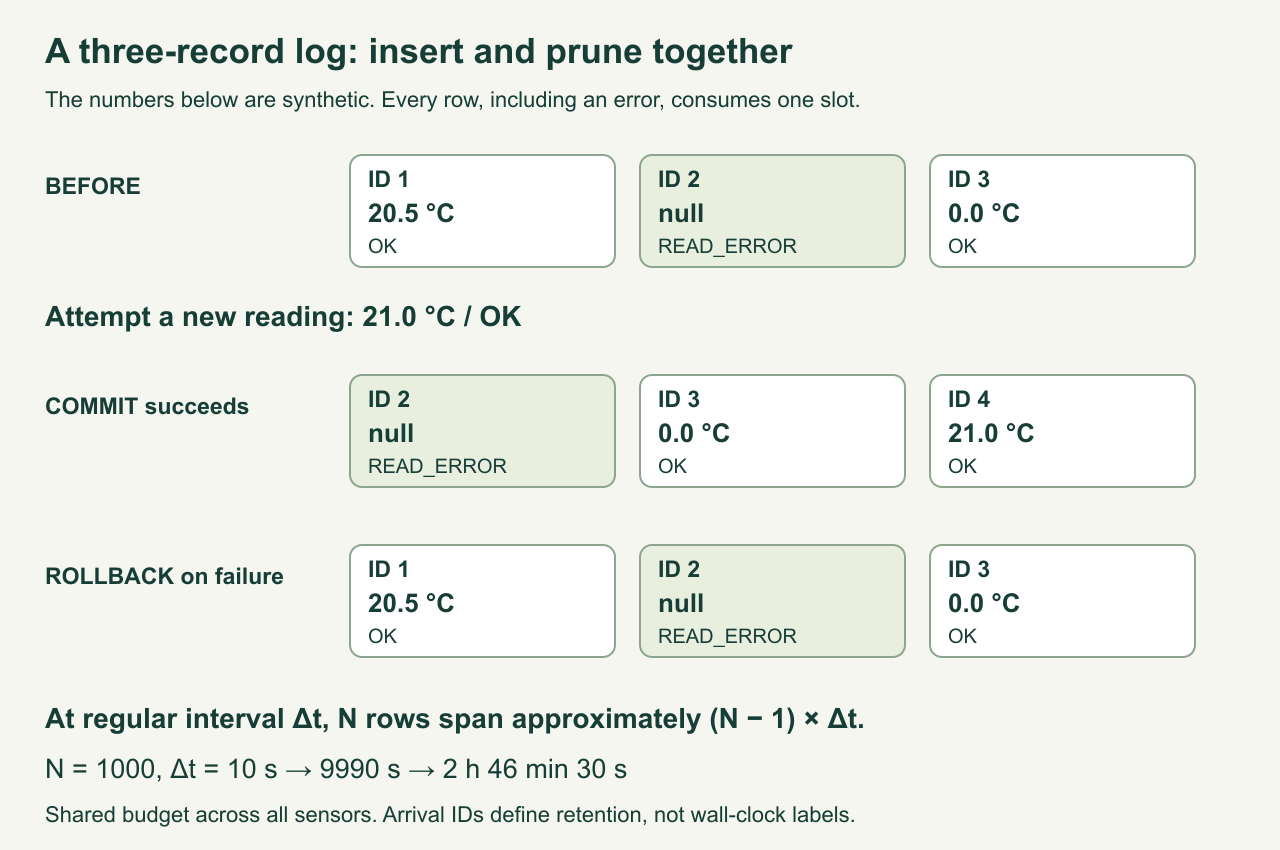
A row limit is not a fixed byte limit. Database pages, indexes, a transaction journal, filesystem metadata and other applications also occupy storage. SQLite can reuse freed pages; ordinary deletion does not necessarily shrink the file. The small names and numeric fields keep our rows modest, but this article makes no precise disk-size or card-lifetime promise. We choose rollback-journal DELETE mode with synchronous=EXTRA and check that both settings were accepted. See the SQLite PRAGMA reference for their meaning.
The complete program
Save this as bounded_log.py in a new experiment folder. Use a database dedicated to this lesson on a local filesystem, outside a cloud-synced or network folder. Do not point it at another application’s database. The constructor rejects unrelated table sets and mismatched retention settings; it is not a migration tool or a checker for arbitrary database files.
The --limit option sets the budget when a database is created. Later commands read the stored budget. Supplying a different budget fails instead of silently deleting more history. Use another database filename to try a different limit. Commands including show and check initialise a new database if that path does not exist, so keep the filename consistent.
"""Tricky Circuit: a small, local SQLite experiment log. Python 3.11+.

Use a new database dedicated to this lesson, on a local filesystem.
One sample = one transaction. No sensor driver or delivery queue is included.
"""
import argparse
from datetime import datetime, timezone
import json
import math
import re
import sqlite3
import sys


def utc_now():
    return datetime.now(timezone.utc).isoformat(timespec="seconds")


class ExperimentLog:
    def __init__(self, path, limit=None, timeout=2.0):
        if limit is not None and (type(limit) is not int or not 1 <= limit <= 100000):
            raise ValueError("limit must be an integer from 1 to 100000")
        self.db = sqlite3.connect(path, timeout=timeout, isolation_level=None)
        self.db.row_factory = sqlite3.Row
        try:
            tables = {r[0] for r in self.db.execute(
                "SELECT name FROM sqlite_master WHERE type='table' AND name NOT LIKE 'sqlite_%'")}
            if tables and tables != {"tc_log_config", "tc_samples"}:
                raise ValueError("not a dedicated Tricky Circuit experiment database")
            mode = self.db.execute("PRAGMA journal_mode=DELETE").fetchone()[0]
            self.db.execute("PRAGMA synchronous=EXTRA")
            if mode != "delete" or self.db.execute("PRAGMA synchronous").fetchone()[0] != 3:
                raise RuntimeError("required journal/sync settings unavailable")
            self.db.execute("BEGIN IMMEDIATE")
            if not tables:
                self.db.execute("CREATE TABLE tc_log_config(version INTEGER NOT NULL, keep INTEGER NOT NULL)")
                self.db.execute("INSERT INTO tc_log_config VALUES(1, ?)",
                                (1000 if limit is None else limit,))
                self.db.execute("""CREATE TABLE tc_samples(
                    id INTEGER PRIMARY KEY AUTOINCREMENT,
                    received_utc TEXT NOT NULL,
                    sensor TEXT NOT NULL, unit TEXT NOT NULL,
                    value REAL, status TEXT NOT NULL,
                    CHECK ((status='OK' AND value IS NOT NULL) OR
                           (status='READ_ERROR' AND value IS NULL)))""")
            config = self.db.execute("SELECT version, keep FROM tc_log_config").fetchall()
            if len(config) != 1 or config[0][0] != 1 or not 1 <= config[0][1] <= 100000:
                raise ValueError("unsupported log configuration")
            self.limit = config[0][1]
            if limit is not None and limit != self.limit:
                raise ValueError("retention differs; use another database for a new limit")
            self.db.execute("COMMIT")
        except BaseException:
            if self.db.in_transaction:
                self.db.execute("ROLLBACK")
            self.db.close()
            raise

    def append(self, sensor, unit, value, status="OK"):
        for name, text, size in (("sensor", sensor, 32), ("unit", unit, 12)):
            if not isinstance(text, str) or not re.fullmatch(r"[A-Za-z0-9_-]{1,%d}" % size, text):
                raise ValueError(name + " must be a short ASCII name (letters, digits, _ or -)")
        if status == "OK":
            if type(value) not in (int, float) or abs(value) > 1e9 or not math.isfinite(value):
                raise ValueError("OK requires a finite number between -1e9 and 1e9")
        elif status != "READ_ERROR" or value is not None:
            raise ValueError("READ_ERROR requires None; unknown status is not accepted")
        stamp = utc_now()  # Arrival time; retention order uses id, never wall-clock time.
        try:
            self.db.execute("BEGIN IMMEDIATE")
            cur = self.db.execute(
                "INSERT INTO tc_samples(received_utc,sensor,unit,value,status) VALUES(?,?,?,?,?)",
                (stamp, sensor, unit, value, status))
            row_id = cur.lastrowid
            self.db.execute("""DELETE FROM tc_samples WHERE id <= (
                SELECT id FROM tc_samples ORDER BY id DESC LIMIT 1 OFFSET ?)""", (self.limit,))
            self.db.execute("COMMIT")
            return row_id  # Only returned after commit succeeds.
        except BaseException:
            if self.db.in_transaction:
                self.db.execute("ROLLBACK")
            raise

    def rows(self):
        return [dict(r) for r in self.db.execute("SELECT * FROM tc_samples ORDER BY id")]

    def check(self):
        return [r[0] for r in self.db.execute("PRAGMA quick_check")]

    def close(self):
        self.db.close()


def main(argv=None):
    parser = argparse.ArgumentParser(description=__doc__)
    parser.add_argument("--db", default="experiment.sqlite3")
    parser.add_argument("--limit", type=int, help="set once for a new database (default 1000)")
    sub = parser.add_subparsers(dest="command", required=True)
    sub.add_parser("demo", help="append three SYNTHETIC samples, including an error and zero")
    add = sub.add_parser("add")
    add.add_argument("sensor")
    add.add_argument("unit")
    choice = add.add_mutually_exclusive_group(required=True)
    choice.add_argument("--value", type=float)
    choice.add_argument("--read-error", action="store_true")
    sub.add_parser("show")
    sub.add_parser("check")
    args = parser.parse_args(argv)
    log = None
    try:
        log = ExperimentLog(args.db, args.limit)
        if args.command == "demo":
            for value, status in [(20.5, "OK"), (None, "READ_ERROR"), (0.0, "OK")]:
                print("committed", log.append("DEMO_room", "degC", value, status))
        elif args.command == "add":
            status = "READ_ERROR" if args.read_error else "OK"
            print("committed", log.append(args.sensor, args.unit, args.value, status))
        elif args.command == "show":
            for row in log.rows():
                print(json.dumps(row, allow_nan=False))
        else:
            result = log.check()
            print(json.dumps(result))
            return 0 if result == ["ok"] else 2
        return 0
    except (ValueError, RuntimeError, sqlite3.Error, OSError) as exc:
        print("LOG ERROR: " + str(exc), file=sys.stderr)
        return 2  # Stop: do not turn a failed write into a sensor error or silently retry.
    finally:
        if log is not None:
            log.close()


if __name__ == "__main__":
    raise SystemExit(main())
Download the program (bounded_log.py inside ZIP) or the program, tests and original diagrams together. The test package preserves its code/ and research/pi-bounded-log/ directories. There is no firmware binary to flash.
A repeatable experiment in a fresh folder
First inspect your versions. This checks the installed environment; it does not change packages or enable interfaces.
python3 --version
python3 -c 'import sqlite3; print(sqlite3.sqlite_version)'- Create a three-row log and add the synthetic trio. Run the first command below once in a fresh folder. The normal output is
committed 1,committed 2,committed 3. Running it again intentionally adds another three records; the demo is not idempotent. - Read it back. The three values should be
20.5,nulland0.0, with statusesOK,READ_ERRORandOK. Your timestamp labels will differ. - Add a fourth record. Row 1 is evicted; the error row, valid zero and new 21.0 remain. The error is still visible even though another reading succeeded.
- Try an invalid number. The NaN command must print
LOG ERRORand exit with code 2. NaN means “not a number.” It must not appear as a valid sample or displace any row. - Close and restart the program. Each command is a separate process. Run
showagain and check that the last three records persist. Then runcheck; the expected result is["ok"].
python3 bounded_log.py --db trial.sqlite3 --limit 3 demo
python3 bounded_log.py --db trial.sqlite3 show
python3 bounded_log.py --db trial.sqlite3 add room degC --value 21
python3 bounded_log.py --db trial.sqlite3 add room degC --value nan
python3 bounded_log.py --db trial.sqlite3 show
python3 bounded_log.py --db trial.sqlite3 check
Now append a deliberate acquisition error with the command below. It is a record about a failed sample, not an instruction to break hardware. A real sensor adapter should call the same method only after its actual read failed. There is no sensor acquisition loop in this lesson.
python3 bounded_log.py --db trial.sqlite3 add room degC --read-errorFor a regular project, create a different database using --limit 1000. A successful reading can call log.append("room", "degC", measured_value); a known read failure can call log.append("room", "degC", None, "READ_ERROR"). Keep the acquisition exception handler separate from the database write. Catching every exception as a sensor failure could hide a full disk or a database problem. Keep units consistent for each channel, and retain any sensor timestamps or sequence numbers separately if the application needs them.
What a failure really means
| Observation | Interpretation and next step |
|---|---|
| READ_ERROR row with null value | The caller explicitly reported an acquisition failure. Inspect the sensor, connection and driver; do not graph it as zero. |
| LOG ERROR, database is locked | Another writer held the lock beyond the timeout, normally two seconds here. Stop the competing writer and inspect the existing rows before deciding whether to retry. |
| LOG ERROR, database or disk is full | The storage write failed. Stop acquisition, inspect free space and preserve the existing database and journal. Do not discard the journal to make room. |
| LOG ERROR after an invalid value or changed limit | The input or configuration was rejected. The rejected sample is not an error row and does not prune history. |
| The program stopped before printing committed | There is no acknowledgement. Inspect stored rows; it may have stopped before commit or after commit but before printing. |
| A timestamp moves backward | The system clock changed. IDs still define arrival order; they cannot repair inaccurate time labels. |
BEGIN IMMEDIATE obtains the write transaction early. If an insert, prune or commit raises an exception, the code rolls back any transaction still open and reports failure. It does not repeatedly retry in the background. SQLite documents the lock and transaction behavior in its transaction reference.
There is a subtle limit to an acknowledgement: the database can commit successfully and the process can stop before the caller receives the returned ID or terminal output. Replaying the sample could then create a duplicate. This small logger provides neither exactly-once delivery nor deduplication. A networked producer needs a stable source event ID and an explicit duplicate policy. Do not infer delivery guarantees from the increasing database ID.
SQLite’s atomic commit is designed to recover from interrupted transactions, subject to its operating-system and storage assumptions. A successful software test does not prove that a particular SD card honours writes during a power cut. Shut the Pi down normally, keep backups, and investigate power problems separately. quick_check checks database structure; it cannot prove the sensor values are true, all samples arrived, or the card is healthy. The atomic-commit explanation describes the underlying limits.
Repeat the fault tests without unplugging power
Extract the accompanying package and run this from its top-level directory:
python3 research/pi-bounded-log/test_bounded_log.pyThe suite uses disposable temporary database files. It checks real transactions and the actual program: error versus zero, global retention, reopen, clock correction, invalid values, configuration mismatch, a competing writer, read-only writes and a failure during pruning. It also sets a deliberately small SQLite page allowance and triggers a large test allocation to produce SQLITE_FULL. That exercises a database-full error without filling your computer’s disk.
Another test launches a child process and terminates it after the insert, immediately before pruning. Reopening the file must reveal the original three rows and pass the structural check. That is an abrupt process termination. It is not an operating-system crash or power-loss test. The child and its temporary files are isolated from your experiment log. Record the Python and SQLite versions, output and any failure when repeating it on the Pi.
Before making this a continuously running service, measure write latency on the actual storage, decide what to do when samples arrive faster than writes finish, and choose a backup policy. This one-record-per-transaction design favours a visible commit boundary over maximum throughput. It contains no queue to absorb a long outage and no mechanism to reconstruct readings that were never saved.
Challenge: keep a full day
One sensor writes every 10 seconds. Is a 1,000-row budget enough for a day?
No. It takes 8,640 sampling intervals to span 86,400 seconds. To retain endpoints separated by at least a full day at exact 10-second spacing, keep at least 8,641 records. A budget of 8,640 contains 8,639 intervals and spans 86,390 seconds. Extra sensors and error records consume the same global budget, and irregular arrivals invalidate a simple fixed time-span guarantee.
Continue exploring input, output and errors in the Tricky Circuit lessons. For a practical sensor-to-output example, see the Pico ultrasonic instrument; its invalid echo becomes silence. Here, an invalid acquisition becomes an explicit record instead.
Download the source package (ZIP): complete programs, full-size PNG and editable SVG diagrams, and the logger’s host tests. The same complete article program is included above.