Put a small box on its side and leave it there. Should its tilt sensor report one change, a stream of repeated alarms, or nothing because the movement already ended? A simple ball switch makes this a useful experiment. Its electrical contact can remain in one state while the object is still, chatter near a boundary, or change too briefly for a slow program to notice.
Build a two-state observation log with the Joy-IT KY-020 tilt-switch module and an original Raspberry Pi Pico. You will compare the raw contact level with a qualified state, record both directions of change, and deliberately discover events the software cannot count. The result is a record of observed electrical states, not an angle meter or a measure of how hard something moved.
What is inside a tilt-switch module?
A tilt switch changes an electrical contact according to its orientation. Joy-IT describes the KY-020 as a ball-operated contact: a moving ball can join contacts inside the switch. Orientation is the way an object faces relative to its surroundings. The ball responds to its mechanical conditions; the module does not send a number of degrees. Its output is digital, meaning that we read one of two electrical levels.
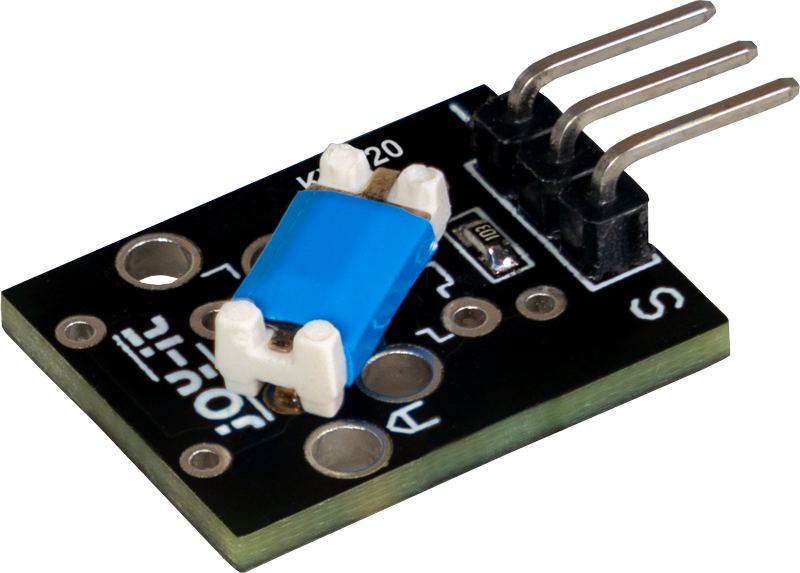
Do not call a low reading “30 degrees.” Neither this experiment nor the retrieved module page establishes a calibrated switching angle. How you mount the module changes which physical positions correspond to its two states. Rotation about a different axis may produce a different result. You will label two repeatable bench positions A and B after observing your own unit, and keep those labels separate from the electrical values 0 and 1.
This is also different from an accelerometer, an instrument that reports acceleration along one or more directions. Acceleration describes how quickly motion’s speed or direction changes. A ball contact cannot report its magnitude, distinguish every movement direction, or reconstruct a complete motion. A contact change can result from tilting, handling, vibration or a loose wire. The log will report what was observed without deciding which physical cause is true.
Use the documented module at 3.3 V
Use an original non-wireless Raspberry Pi Pico with RP2040, with usable headers, running the official RPI_PICO MicroPython v1.26.0 build. Headers are rows of metal connector pins. MicroPython is a Python interpreter for microcontrollers. This is a pinned version for repeatable instructions, not a claim about the newest release. USB means Universal Serial Bus; its Micro-USB connector supplies the Pico and the computer’s console connection.
| Item | Requirement | Purpose |
|---|---|---|
| Module | Joy-IT KY-020 matching its current photograph and pin-assignment drawing | A documented digital tilt-contact input, not an unidentified vibration or angle module. |
| Controller | Original Pico RP2040, headers and MicroPython v1.26.0 | Reads the input and prints the observed event log. |
| Connections | Three short insulated leads, stable breadboard or suitable connectors, USB data cable | A breadboard holds connections with reusable spring contacts. Keep the reference wiring fixed while the module’s mounting changes. |
| Fixture | A small nonconducting card, reusable mounting material and two marked supports | Make positions A and B repeatable without holding bare wires against the board. |
| Checks | A digital multimeter and the exact manufacturer pin drawing | The meter measures electrical quantities. Check continuity, a conducting connection, with power off; confirm supply/signal voltage before relying on a log. |
Voltage is the electrical difference between two points; a volt, V, is its unit. The manufacturer page lists 3.3–5 V operation and provides a Pico connection at 3.3 V. Use only 3.3 V for this circuit so that the module output stays in the Pico’s logic domain. A module’s ability to receive 5 V does not make a controller input tolerant of a 5 V signal.
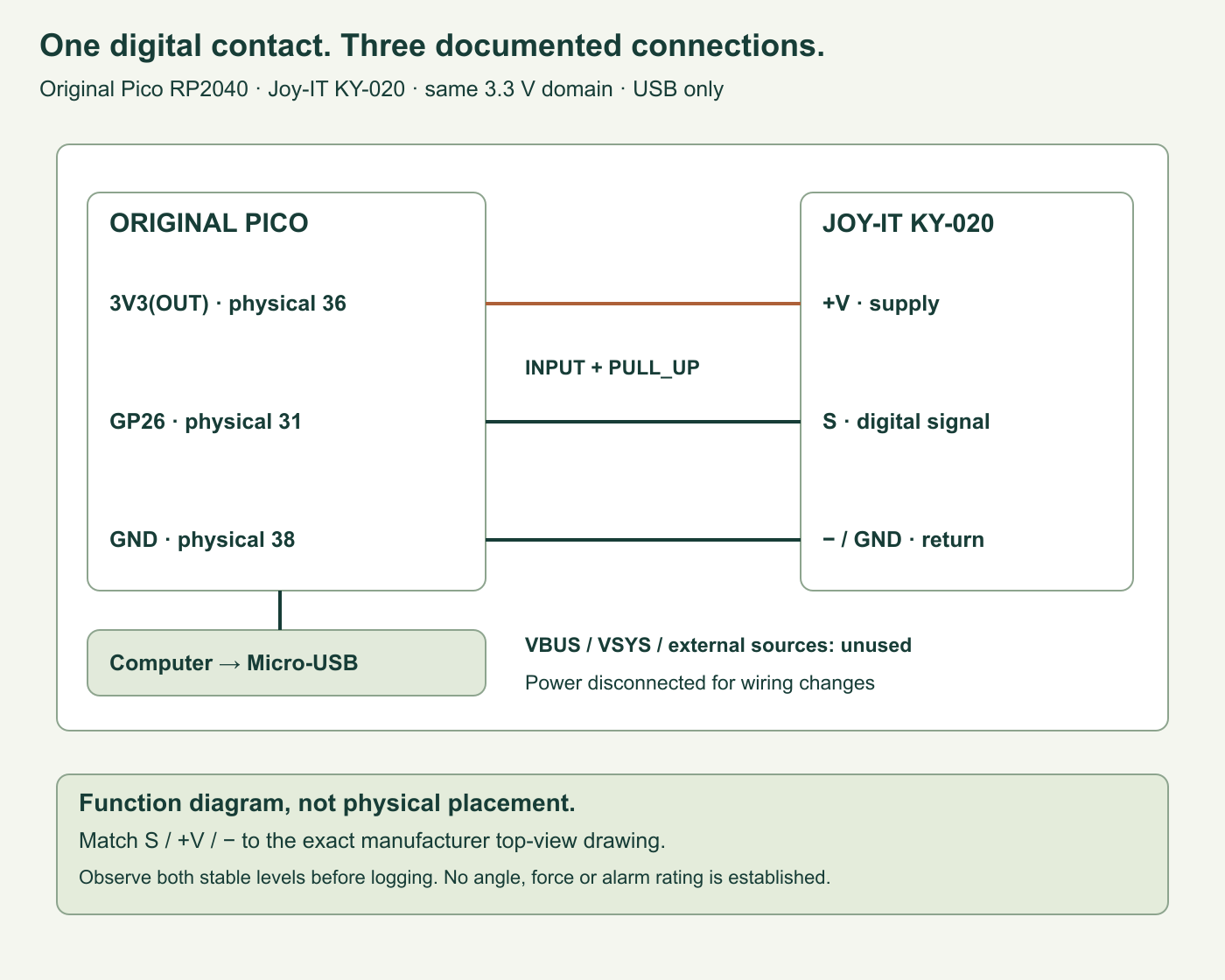
GPIO means general-purpose input/output, a configurable controller connection. GND means ground, the common voltage reference and return. The signal name GP26 is not physical header position 26. According to the Pico pin map, GP26 is physical position 31, 3V3(OUT) is position 36 and a suitable GND is position 38.
| Connection | Meaning |
|---|---|
| Pico 3V3(OUT), physical 36 → module +V | The middle supply contact in Joy-IT’s stated top-view orientation. |
| Pico GND, physical 38 → module − / GND | The ground-side contact; verify the minus mark against the actual drawing. |
| Module S → Pico GP26, physical 31 | S is the digital signal. GP26 is configured as an input, never an output. |
| Computer → Pico Micro-USB | The only power source. Leave VBUS, VSYS and external supplies out of the module wiring. |
VBUS and VSYS are power-pin labels: respectively the USB supply-voltage node and the system supply input. They are not this module’s 3.3 V connection. Disconnect USB before connecting or moving wires. In Joy-IT’s drawing, with the module component side facing you and its three header contacts pointing downward, S is at the left, +V is in the middle and minus is at the right. Read that orientation directly from the drawing and your actual board; do not transfer a cable’s colors from a different product. Check breadboard contact groups with power off.
The program uses Pin.PULL_UP, a weak internal connection toward 3.3 V that gives an open contact a defined high tendency. Joy-IT’s Raspberry Pi and Micro:bit examples use a pull-up, while its displayed Pico example uses a pull-down with a falling-edge interrupt: a hardware-triggered response to a high-to-low change. We do not silently treat those examples as a consistent circuit specification. Our design repeatedly reads an input with a pull-up and requires the bench check below to obtain two distinct stable levels. No undocumented internal resistor topology is invented.
Learn two states before logging events
Fix the module to the card so that changing orientation does not pull its leads. With the circuit inspected, power through USB. Use the input-reading setup from the complete program, or the interactive console, to observe GP26 while slowly moving between several resting positions. A logic level is the interpreted digital value: 0 is low and 1 is high. It is not a measurement of angle.
Find one position that stays mostly at 0 and another that stays mostly at 1. Mark their supports A and B, and record which level actually belongs to each. Wait at least a second in each position. Check the module supply and signal relative to the same GND with a voltage meter; a stable display cannot rule out every brief change. If you cannot obtain both states, stop and inspect module identity, contact mapping and connections before blaming the program.
Do not remove the switch’s cover to inspect its mechanism. Do not immerse, strike or shake the assembly violently. This is a small tabletop observation fixture. Moving the supports deliberately is enough to investigate the difference between a lasting orientation and a momentary contact disturbance. It is not a qualified alarm, impact detector or safety control.
A raw change is not yet an accepted state
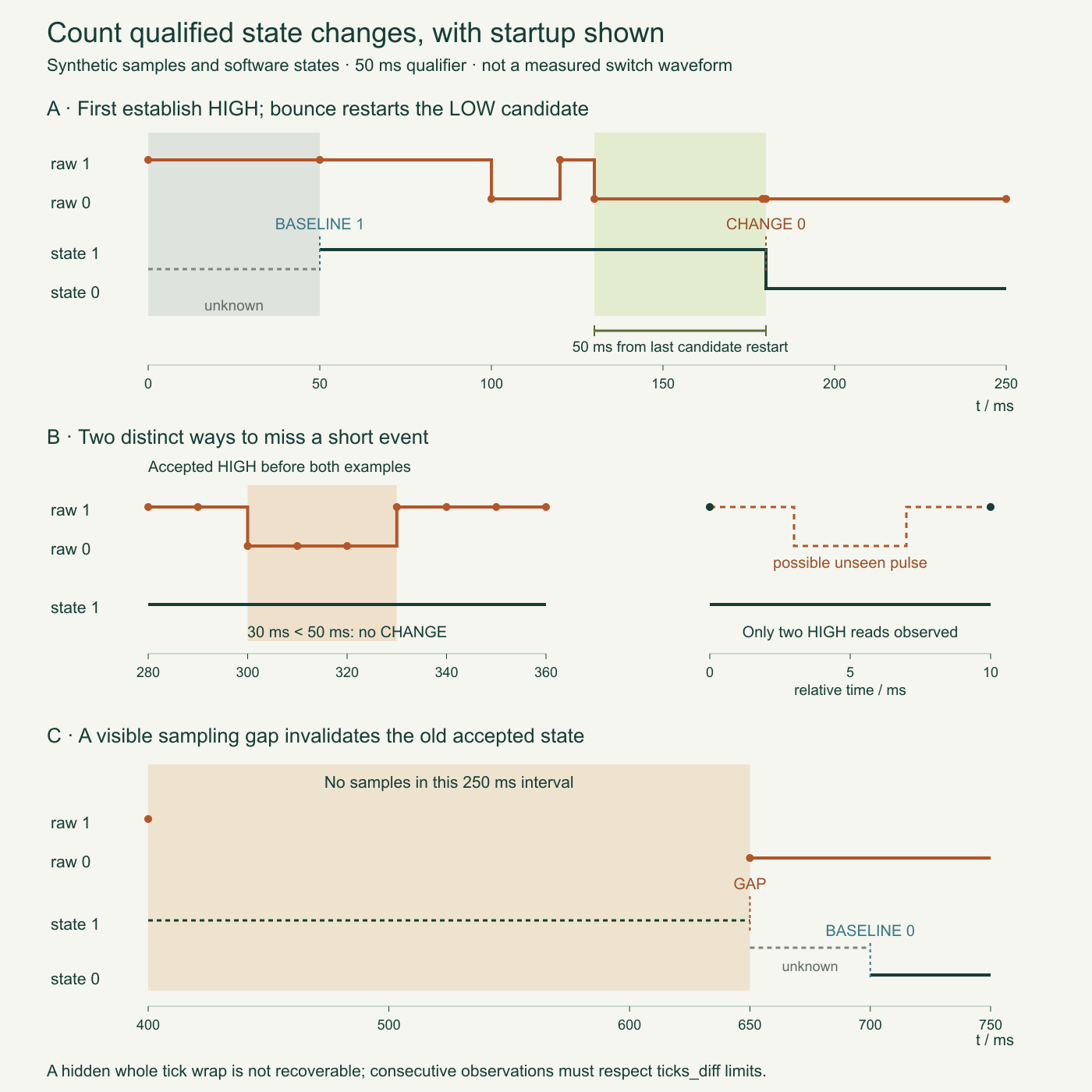
Contact bounce is a sequence of unwanted rapid openings and closings around a contact change. Near an orientation boundary, a ball switch can also alternate because its physical position remains uncertain. The software cannot identify those causes from a two-state wire. It can apply a stated rule: accept a candidate level only after the sampled candidate has remained unchanged for at least 50 milliseconds. A millisecond, ms, is one thousandth of a second.
The raw level is the newest input reading. The candidate is the level currently waiting to qualify. The accepted state is the last level that passed the waiting rule. When a new raw value disagrees with the candidate, its timer restarts. Holding the same position does not produce repeated CHANGE events because the accepted state already matches it.
Startup is special: there is no previous known orientation. The first settled observation is recorded as BASELINE and does not increase the transition count. Only later settled differences produce CHANGE. Both 0→1 and 1→0 count; neither direction is automatically called “tilted” until you have related it to your own marked supports.
Consider synthetic samples: the candidate first becomes 0 at 100 ms, returns to 1 at 120 ms and becomes 0 again at 130 ms. An unchanged 0 at 179 ms has waited only 49 ms. A matching observation at 180 ms can qualify it. The earlier 100 ms sample cannot be reused to claim 80 ms of continuous stability. These are algorithm examples, not measured switch waveforms.
Run the complete event logger
Save the supplied program as main.py on the Pico after installing the pinned firmware. Firmware is software stored for execution on the controller. Keep the source on your computer as well. The REPL, or read–evaluate–print loop, is the interactive Python console reached through USB; confirm its startup banner identifies the expected Pico build before running the experiment.
The logger requests a five-millisecond pause between reads. This is polling: repeatedly examining the input in the main loop. It is not a guaranteed 200 samples per second. Interpreter work, computer communication and output delays add time. The implementation uses no interrupt callback and performs no filesystem writes, so a print operation is not being disguised as a precise hardware timestamp.
Each output row contains a sequence number, observed elapsed milliseconds, record kind, digital level, accepted-state dwell, raw-change count and transition count. Dwell here means elapsed time between accepted states, including their qualification timing; it is not the exact physical time the ball touched a contact. CSV means comma-separated values, the table format used for these console lines. Missing dwell is an empty cell rather than a fabricated zero.
Complete MicroPython source and download
Download the entire program (tilt_event_log.py inside ZIP). The hardware imports are inside run(), letting host tests exercise the same logger and loop with controlled input/clock boundaries.
"""Joy-IT KY-020 / original Pico RP2040, MicroPython v1.26.0.

USB only. +V -> 3V3 OUT, minus -> GND, S -> GP26.
Digital levels and observed settled transitions, never angle or motion strength.
No files are written. Host tests inject the clock and GPIO boundary.
"""

class TiltLog:
    def __init__(self, now, ticks_diff, stable_ms=50, max_gap_ms=200, capacity=16):
        if not isinstance(stable_ms, int) or not 1 <= stable_ms <= 1000:
            raise ValueError("stable_ms must be 1..1000")
        if not isinstance(max_gap_ms, int) or not 1 <= max_gap_ms <= 5000:
            raise ValueError("max_gap_ms must be 1..5000")
        if not isinstance(capacity, int) or not 1 <= capacity <= 128:
            raise ValueError("capacity must be 1..128")
        self.diff = ticks_diff
        self.stable_ms = stable_ms
        self.max_gap_ms = max_gap_ms
        self.capacity = capacity
        self.last_tick = now
        self.elapsed_ms = 0
        self.candidate = None
        self.candidate_since = 0
        self.stable = None
        self.accepted_since = None
        self.raw_changes = 0
        self.transitions = 0
        self.seq = 0
        self.dropped = 0
        self.records = []

    def _record(self, kind, level, dwell):
        self.seq += 1
        row = (self.seq, self.elapsed_ms, kind, level, dwell,
               self.raw_changes, self.transitions)
        if len(self.records) == self.capacity:
            self.records.pop(0)
            self.dropped += 1
        self.records.append(row)
        return row

    def sample(self, raw, now):
        if raw not in (0, 1):
            raise ValueError("digital level must be 0 or 1")
        step = self.diff(now, self.last_tick)
        if step < 0:
            raise ValueError("clock order or tick half-period assumption violated")
        self.last_tick = now
        self.elapsed_ms += step
        if step > self.max_gap_ms:
            self.candidate = raw
            self.candidate_since = self.elapsed_ms
            self.stable = None
            self.accepted_since = None
            return self._record("GAP", raw, None)
        if self.candidate is None:
            self.candidate = raw
            self.candidate_since = self.elapsed_ms
            return None
        if raw != self.candidate:
            self.raw_changes += 1
            self.candidate = raw
            self.candidate_since = self.elapsed_ms
        if raw == self.stable or self.elapsed_ms - self.candidate_since < self.stable_ms:
            return None
        if self.stable is None:
            self.stable = raw
            self.accepted_since = self.elapsed_ms
            return self._record("BASELINE", raw, None)
        dwell = self.elapsed_ms - self.accepted_since
        self.stable = raw
        self.accepted_since = self.elapsed_ms
        self.transitions += 1
        return self._record("CHANGE", raw, dwell)

def csv_row(row):
    return ",".join("" if value is None else str(value) for value in row)

def run(pin_factory=None, clock=None, sleep=None, emit=print, max_samples=None):
    if max_samples is not None and (not isinstance(max_samples, int) or max_samples < 1):
        raise ValueError("max_samples is a positive host-test limit")
    if pin_factory is None:
        from machine import Pin
        pin_factory = lambda: Pin(26, Pin.IN, Pin.PULL_UP)
    if clock is None:
        import time
        clock = time
    if sleep is None:
        sleep = clock.sleep_ms
    pin = pin_factory()
    log = TiltLog(clock.ticks_ms(), clock.ticks_diff)
    emit("seq,observed_elapsed_ms,kind,level,accepted_dwell_ms,raw_changes,transitions")
    samples = 0
    try:
        while max_samples is None or samples < max_samples:
            row = log.sample(pin.value(), clock.ticks_ms())
            if row is not None:
                emit(csv_row(row))
            samples += 1
            sleep(5)
    except KeyboardInterrupt:
        emit("# stopped by user; no persistent log file was written")
    except Exception:
        emit("# ERROR: sampling stopped; later levels are unknown")
        raise
    return log

if __name__ == "__main__":
    logger = run()
After stopping this program with Ctrl+C in the REPL, type logger.records to inspect the retained rows and logger.dropped to see how many old rows were discarded. The final logger = run() assignment keeps the returned logger available for inspection. Resetting or unplugging the board clears it.
The most recent 16 records remain in working memory. This temporary record store is a buffer. When full, it discards its oldest record and increases a dropped-record counter. This bounds retained records, not the duration of a persistent history; power loss clears everything. Console output can be saved using your terminal’s own capture feature, but this program does not write a log file to Pico flash, the nonvolatile program storage. Ordinary integer counters can grow during a long run, so the record limit is not a claim of constant total memory for all time.
Why use elapsed time instead of a calendar date?
The Pico has not been given a reliable date and time in this project. A row therefore reports time accumulated from observed loop intervals, not a calendar timestamp. MicroPython’s ticks_ms() is an increasing counter that eventually wraps to its beginning. The period is implementation dependent. Use ticks_diff() to compare its readings rather than subtracting them directly.
The program accumulates these short signed differences into its elapsed counter. This remains meaningful only when consecutive samples occur within the tick counter’s documented half-period limit. It cannot detect every pause longer than that limit: an entire wrap can hide in the arithmetic. There is no claim that this small logger supervises a frozen computer or recovers a lost time reference.
For ordinary observable delays, a positive measured gap greater than 200 ms creates a GAP record. The logger invalidates its old stable state and qualifies a fresh BASELINE instead of inventing a transition somewhere during the missing interval. A 200 ms interval is still allowed by the selected setting; 201 ms is a gap. The threshold is a design choice, not a statement about the module’s mechanical settling time.
Five repeatable bench experiments
- Start still. Place the card at A before applying USB power. Leave it alone for several seconds. Expect one settled BASELINE and no CHANGE merely because the same level was read many times. Repeat startup at B and compare the baseline level. Startup is not a counted movement.
- Move once, then hold. Move to the other marked support and leave the card there for two seconds. Expect at most the settled changes actually observed, not one event per sampling pass. Return and repeat. Record extra raw changes separately from accepted transitions; do not replace an untidy trace with the expected count.
- Explore the boundary. Rest near a position where the raw input alternates. Observe whether a candidate ever lasts long enough to qualify. A lack of CHANGE can mean that the rule rejects the uncertain state, not that the sensor is electrically dead. Move back to a known stable support to distinguish the two cases.
- Look for missed short behavior. Make a gentle brief excursion and return to the original support. The program may reject a sampled pulse shorter than 50 ms, or miss an entire pulse between reads. Do not use this experiment to claim an exact minimum detectable motion; a separate input waveform measurement would be required.
- Compare uninterrupted and delayed observation. A slow terminal or deliberate host-side test can produce a large sampling gap. Inspect GAP followed by a new BASELINE. Do not turn an unknown interval into an orientation event. The included host tests exercise this rule without unplugging or damaging hardware.
Use the blank bench-observation worksheet (tilt-module-event-log-observations-blank.csv inside ZIP) to record actual results separately from expected behavior.
Keep module revision, firmware, support labels, wiring, qualification interval and observation method in your notes. Change one setting at a time. If you compare 20 ms and 100 ms qualification later, repeat the same intended position sequence. Shorter qualification accepts more brief candidates; longer qualification sacrifices response to short changes. Neither setting makes the module measure angle or solves every false trigger.
What the event count cannot establish
A broken signal wire can look like a released high input because of the pull-up. A signal short to ground can look like a stable low. This circuit contains no supervised contact network that separates those faults from legitimate module states. Power down before inspecting loose leads. Do not label a long high or low interval “sensor healthy” simply because no exception occurred.
A stable position is not necessarily an unchanged electrical contact at every instant. The logger only sees its samples. For example, two high samples ten milliseconds apart are consistent with a low pulse that began and ended between them. No filter can reconstruct that invisible pulse from those readings alone. An interrupt-based design changes the observation method but brings its own bounce, timing and buffering requirements; it is not automatically an angle instrument either.
The module signal is kept in the same 3.3 V domain as the Pico. No motor, relay, siren, mains circuit or external alarm controller is driven. If a later project needs an output, its interface and fault behavior require a separate design. A pleasing console demonstration does not qualify a security installation or a machine interlock.
Challenge: one movement or two accepted changes?
The card starts at a stable high level, moves to a stable low position for a second, then returns to its stable high position. The logger can report two CHANGE records: one in each direction. Calling that one physical “trip” would require another definition and state machine. If the low excursion lasts only 30 ms, the 50 ms qualifier should reject it when sampled; if it happens entirely between reads, the logger has no evidence of it at all.
After an observable 201 ms gap, a newly qualified low reading is a BASELINE, not proof of when the orientation changed. Preserve the unknown interval rather than manufacturing a precise event time.
Checked behavior and primary references
The supplied host suite runs 25 tests against the actual program. It exercises high and low startup, exact qualification boundaries, repeated stable samples, alternating noise, both transition directions, sampled and unseen short pulses, accepted dwell, tick wrap, capacity eviction, sampling-gap rebaselining, invalid input and the actual run loop’s error and interruption paths. It also executes the main entry point with controlled hardware interfaces and confirms retained records remain accessible after Ctrl+C. Those are software observations with controlled boundaries, not measurements of a physical ball or a Pico input.
The source code, blank physical observations and synthetic diagram must remain distinguishable. No real switching angle, maximum contact frequency, operating lifetime, alarm reliability or measured sample period is claimed. Native controller execution, wiring inspection and your two marked resting positions are still bench work for the reader.
- Joy-IT KY-020 documentation: exact module photograph, supply information and signal/+V/GND assignment. Its differing platform examples are recorded in the design review.
- Raspberry Pi Pico documentation: identify the original RP2040 board and its connector functions.
- MicroPython v1.26.0 RP2 reference: Pin inputs, pull-up configuration and the USB console.
- MicroPython v1.26.0 time reference: tick counters, wrap-aware differences and delay limitations.
Continue with the Tricky Circuit interactive lessons when you want to compare contact inputs with other ways of sensing the physical world.
Download the experiment sources (ZIP): complete programs, full-size PNG and editable SVG diagrams, and blank worksheets where supplied. The complete article program remains inline above.