

You leave one LED program running, start another in a second terminal, and now neither command stream tells the whole story. The pin can also be reserved by a backend or another service. This experiment establishes a visible ownership rule before allocating the output: cooperating copies of the program must acquire the same local file lock.
The hardware profile is a Raspberry Pi 4 Model B, Raspberry Pi OS Bookworm, Python 3.11 and gpiozero 2.0.1, using its documented LGPIOFactory backend on gpiochip 0. GPIO means general-purpose input/output, a programmable signal pin. A backend is the software layer that sends those requests to the operating system (OS). This is not a Pico program and does not depend on precise waveform timing.
Verification uses real host Unix file locks and child processes plus an injected LED object. The actual GPIO adapter has not been run, and no Pi execution, firmware build, physical voltage or LED-state measurement is claimed. The --mock option imports no gpiozero package and touches no GPIO pin.
One small output is enough
Use one Kingbright WP7113ID red light-emitting diode (LED) and one 1 kΩ resistor rated at least 0.125 W. Connect GPIO17, physical header pin 11, through the resistor to the LED anode; connect its cathode to ground, physical pin 9. The software uses Broadcom (BCM) GPIO numbering, so 17 is a signal name rather than the seventeenth header position.
Wire the selected pin and LED
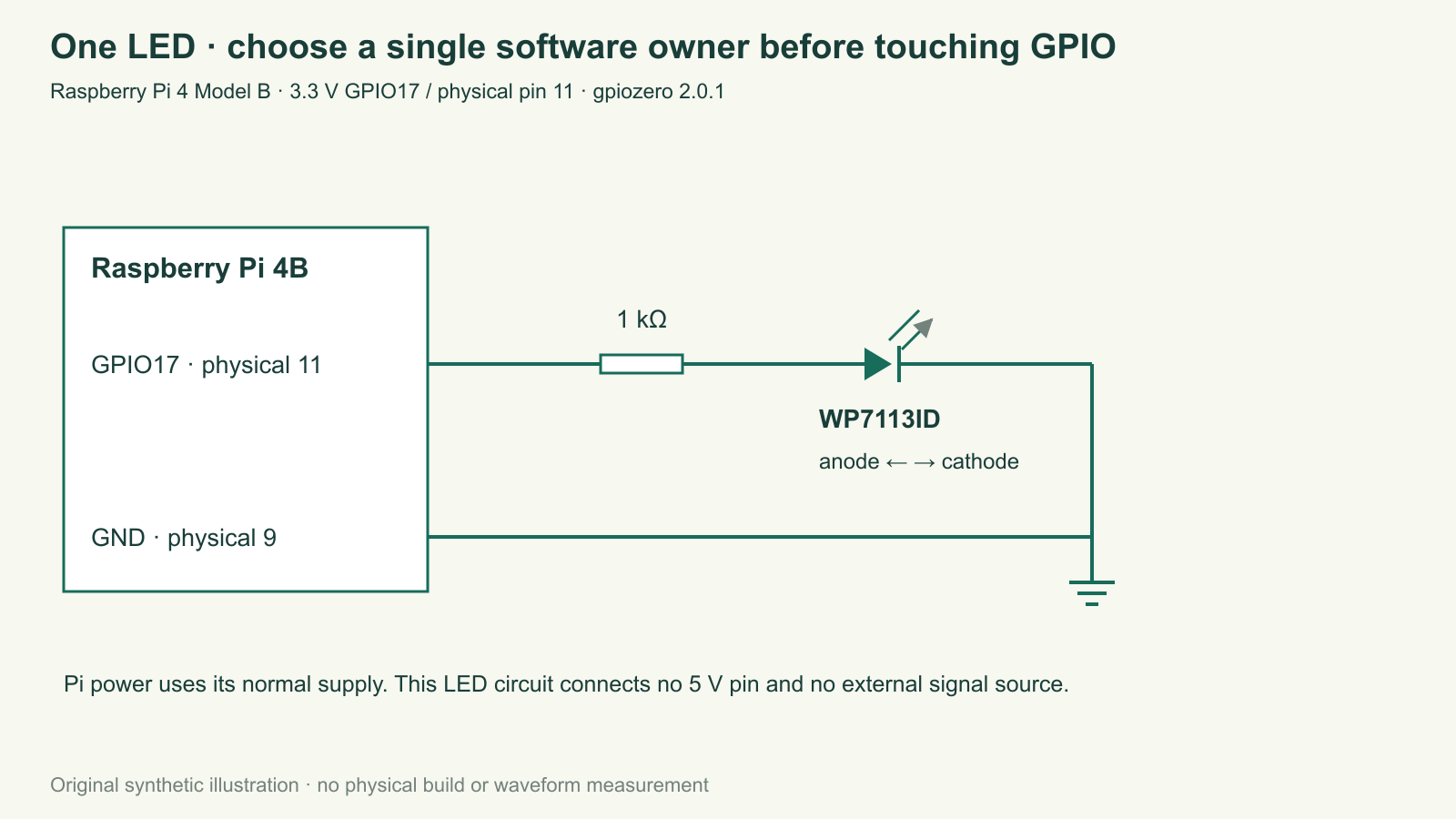
For an illustrative 1.9 V forward drop at a nominal 3.3 V output, current is about (3.3−1.9)/1000=1.4 mA. The forward drop depends on current, part and temperature. Ignoring the LED drop gives a conservative nominal bound of 3.3 mA through the resistor, before rail and resistor tolerance. This small load is intentional; an absolute maximum or configurable drive-strength number is not a target current.
Disconnect power before wiring and verify polarity from the exact LED drawing. Use the Pi’s normal power supply. No 5 V header pin, relay, motor or external signal source connects to this output. Pi GPIO is a 3.3 V domain. The lock demonstration does not require connecting the LED until the software-only sequence has been understood.
What an advisory lock promises
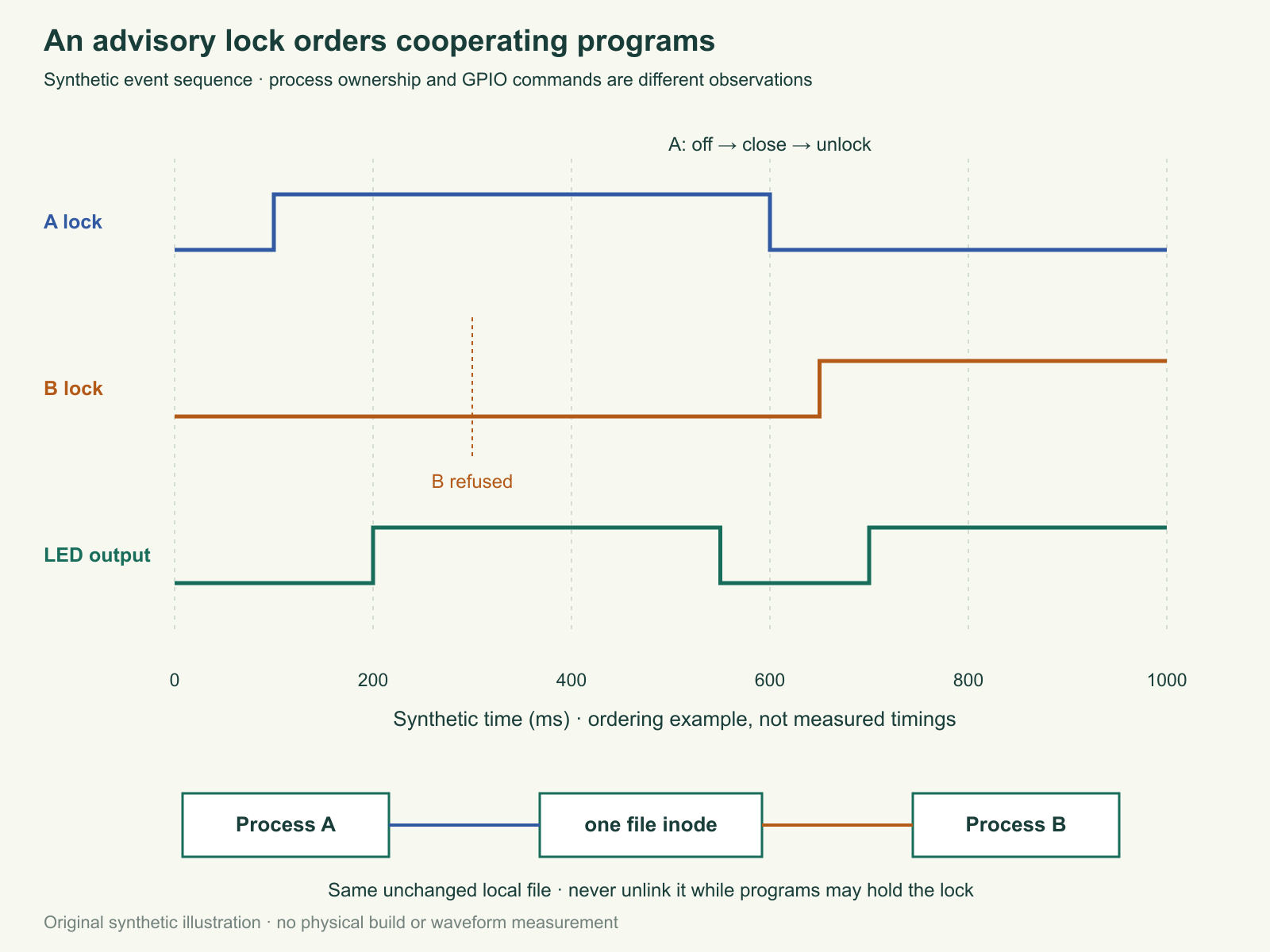
An advisory lock is an OS-supported agreement among programs that choose to check it. The first copy opens a stable local file and requests an exclusive nonblocking flock: exclusive means one participating owner, and nonblocking means a competing request returns promptly instead of waiting indefinitely. The second copy reports BUSY and exits before constructing any GPIO device.
Every participating copy must use the same unchanged local file. A different path to a different file creates a different lock. Do not delete the lock file after use or while another copy may be running. The lock belongs to an open file object, identified by its inode, the filesystem’s identity for that object. Deleting and recreating the pathname can leave the old owner holding the old inode while a new owner locks a different one. The host tests demonstrate this limitation in a temporary directory.
The file may remain after normal exit or a crash. That does not make it a stale held lock. Conversely, a process identifier (PID), the number written into the file for diagnosis, is not proof that a lock is still held. The kernel, the OS component managing file descriptors, decides the lock state. A file descriptor is a process’s handle to an open resource.
Use a local filesystem and one account for this experiment. Network filesystem locking, multiple users, replaced paths and other programs that ignore the convention need a separate design. A lock is not a security boundary or a universal reservation of the physical pin. The GPIO backend may independently refuse an already claimed line; neither mechanism makes unrelated software cooperate automatically.
Complete ownership wrapper and LED adapter
The application programming interface (API), the callable software interface, combines Python’s Unix flock with gpiozero’s LED and pin-factory objects. The actual adapter explicitly selects gpiozero 2.0.1 and Linux gpiochip 0; a mismatched package, missing backend or insufficient device access produces a fault. Record the installed Python, gpiozero and lgpio versions on the Pi before testing. This article does not claim an installed or exercised Pi environment.
Download the complete program (ZIP; file: tricky-circuit-batch-007/code/pi-gpio-single-owner.py). Its first operation under the lock is construction with an initial LOW output. Cleanup attempts LED off, closes the LED and its factory, then leaves the lock context. The order keeps another cooperating copy from acquiring while normal cleanup is still running.
"""Pi4B / Python3.11 / gpiozero2.0.1. Advisory local GPIO17 ownership.
--mock exercises process locks without importing gpiozero or claiming GPIO access.
"""
import argparse,errno,fcntl,json,math,os,signal,stat,time
from pathlib import Path

class StopFlag:
    """Signal handler only assigns requested; normal code performs timed polling."""
    def __init__(self):self.requested=False
    def is_set(self):return self.requested
    def wait(self,seconds):
        deadline=time.monotonic()+seconds
        while not self.requested:
            remaining=deadline-time.monotonic()
            if remaining<=0:return False
            time.sleep(min(0.05,remaining))
        return True

class BusyError(RuntimeError):pass

class OwnerLock:
    def __init__(self,path):self.path=os.fspath(path);self.fd=None
    def __enter__(self):
        flags=os.O_CREAT|os.O_RDWR|os.O_NOFOLLOW|getattr(os,'O_CLOEXEC',0)
        fd=os.open(self.path,flags,0o600)
        try:
            info=os.fstat(fd)
            if not stat.S_ISREG(info.st_mode) or info.st_uid!=os.getuid():
                raise ValueError('lock must be a regular file owned by this user')
            os.set_inheritable(fd,False)
            try:fcntl.flock(fd,fcntl.LOCK_EX|fcntl.LOCK_NB)
            except OSError as exc:
                if exc.errno in (errno.EACCES,errno.EAGAIN):raise BusyError('GPIO17 busy under this lock path')
                raise
            os.ftruncate(fd,0);os.write(fd,(str(os.getpid())+'\n').encode())
        except BaseException:
            os.close(fd);raise
        self.fd=fd;return self
    def __exit__(self,*exc):
        fd,self.fd=self.fd,None
        try:fcntl.flock(fd,fcntl.LOCK_UN)
        finally:os.close(fd)

class PiLED:
    def __init__(self):
        from importlib.metadata import version
        if version('gpiozero')!='2.0.1':raise RuntimeError('Select gpiozero2.0.1 for this qualified software profile')
        from gpiozero import LED
        from gpiozero.pins.lgpio import LGPIOFactory
        self.factory=LGPIOFactory(chip=0)
        try:self.led=LED(17,active_high=True,initial_value=False,pin_factory=self.factory)
        except BaseException:self.factory.close();raise
    def on(self):self.led.on()
    def off(self):self.led.off()
    def close(self):
        try:self.led.close()
        finally:self.factory.close()

class MockLED:
    def __init__(self):self.state=False
    def on(self):self.state=True
    def off(self):self.state=False
    def close(self):pass

def run(factory,path,stop,period_s=0.5,emit=print,limit=None):
    if isinstance(period_s,bool) or not math.isfinite(period_s) or not .05<=period_s<=10:
        raise ValueError('period_s must be finite and0.05..10')
    with OwnerLock(path):
        led=None
        try:
            led=factory();led.off();emit({'event':'OWNED','pid':os.getpid()})
            count=0;on=False
            while not stop.is_set() and (limit is None or count<limit):
                on=not on
                if on:led.on()
                else:led.off()
                count+=1;stop.wait(period_s)
        finally:
            if led is not None:
                try:led.off()
                finally:led.close()
    emit({'event':'RELEASED','gpio_state_measured':False})

def main(argv=None):
    p=argparse.ArgumentParser(description=__doc__)
    p.add_argument('--lock',default=str(Path.home()/'.tricky-circuit-gpio17.lock'))
    p.add_argument('--mock',action='store_true')
    p.add_argument('--cycles',type=int,default=None)
    a=p.parse_args(argv)
    if a.cycles is not None and a.cycles<1:p.error('--cycles must be positive')
    stop=StopFlag()
    def request_stop(*_):stop.requested=True
    for number in (signal.SIGINT,signal.SIGTERM):signal.signal(number,request_stop)
    try:
        run(MockLED if a.mock else PiLED,Path(a.lock).expanduser(),stop,
            emit=lambda row:print(json.dumps(dict(row,mock=a.mock)),flush=True),limit=a.cycles)
    except BusyError as exc:print(json.dumps({'event':'BUSY','error':str(exc)}),flush=True);return 3
    except (OSError,ValueError,RuntimeError,ImportError) as exc:
        print(json.dumps({'event':'FAULT','error':str(exc),'gpio_state_measured':False}),flush=True);return 2
    return 0
if __name__=='__main__':raise SystemExit(main())
SIGINT is the interrupt signal normally sent by Ctrl+C; SIGTERM is a normal termination request. The signal handlers only assign a plain stop flag. Ordinary execution polls that flag between sleep chunks of at most 50 ms, then performs cleanup. OS scheduling can add delay; this is not a hard response bound. The handler acquires no Python condition lock, avoiding a deadlock if a signal interrupts a wait that already holds such a lock. SIGKILL is an uncatchable forced termination. The OS releases that process’s open-file lock when it dies, but Python cannot then promise LED off or backend cleanup. A subsequent owner starts from its own explicit initial LOW; that is a new command, not evidence about the interval before it started.
Output, console, backend and lock-file errors are surfaced. A cleanup off error still attempts close, and the context still closes its lock descriptor. Successful software cleanup is not a voltage measurement. The blink wait is nominally half a second and subject to OS scheduling; use a different experiment for precise pulse generation.
Two-terminal experiment
- In a Unix environment, run
python3 pi-gpio-single-owner.py --mock. Keep it running. In a second terminal run the same command with the same default lock path. It should report BUSY and return exit status 3; no GPIO object is allocated in that second copy. - Stop the first normally with Ctrl+C. The file remains. Start the second again and observe that it can acquire. Compare the printed PID with the advisory-lock outcome rather than treating file existence as ownership.
- On the specified Pi profile, check the actual user has access to gpiochip 0 and verify wiring while unpowered. Run without
--mockonly after that check. Confirm the LED indication, then perform the same two-terminal ownership sequence. - Record normal termination and any cleanup faults. Reproduce uncatchable process death only with
--mockor the host suite: its test proves lock release, not a physical LED state. Do not infer hardware safety from a subprocess exit code. - Use the blank observation sheet (ZIP; file:
tricky-circuit-batch-007/code/pi-gpio-single-owner-observations-blank.csv) to record the exact path, PID, backend, return status and separately observed LED behavior.
Challenge: can I fix BUSY by deleting the lock file?
No. A live owner may still hold the old file object, and recreating the pathname can permit another owner of a new inode. Stop and inspect the participating processes. A remaining unlocked file is normal. Keep one stable local lock identity instead of using deletion as an unlock command.
Primary references and scope
Review the electronics lessons before extending the circuit. This project adds process ownership and cleanup boundaries, rather than duplicating the site’s bounded logger or Pi health-flag article. The actual host suite covers competing processes, normal termination, forced death, constructor/output/console faults, invalid periods and the inode-replacement counterexample.
- Raspberry Pi hardware documentation: 3.3 V GPIO, physical mapping and access requirements.
- gpiozero 2.0.1 LED API and LGPIOFactory: initial value, close and chip selection.
- Python 3.11 fcntl and Debian Bookworm flock semantics: advisory, nonblocking and open-file locking.
- Kingbright WP7113ID current datasheet: package polarity and conditional LED characteristics.
Download the reader files (ZIP): the complete program, blank observation sheet and original editable SVG/PNG diagrams for pi-gpio-single-owner are inside tricky-circuit-batch-007/. The inline program above is complete; the download is supplementary.