A light can keep blinking while a sensor task has stopped doing useful work. Build a small Raspberry Pi Pico experiment that notices this difference: new acquisitions permit watchdog feeds; an old reading does not. Then inject two different faults and observe why a healthy-looking loop is an incomplete health check.
Verification status: the supplied program has been exercised on a host computer with clock, pin, acquisition and watchdog mocks. This is a locally reviewed design. It has not been run on a Pico, timed on hardware or physically assembled. The reset times below are design expectations, not measurements. Use a spare tabletop board with LEDs only.
What the watchdog actually supervises
A watchdog timer (WDT) is a hardware countdown that can restart the microcontroller when software stops refreshing it. Refreshing the countdown is called feeding. A microcontroller is the small computer on the Pico that runs the program and controls its pins. The useful question is not simply whether Python reached a particular line. It is whether the work the application promised has advanced.
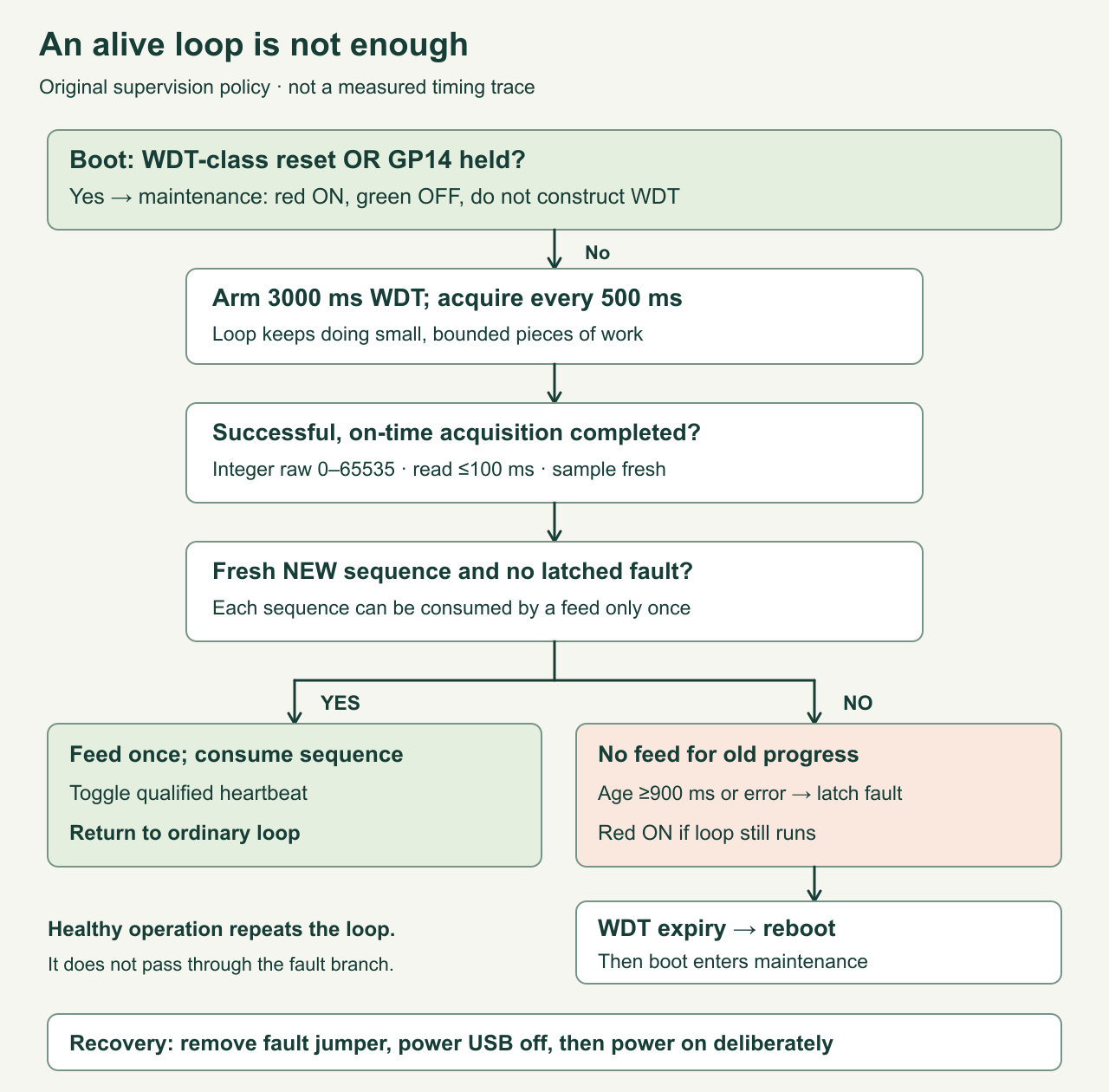
Imagine a room sensor that updates its display continually but has accidentally stopped taking measurements. Feeding the watchdog on every display refresh would preserve that failure indefinitely. This lesson gives successful acquisitions a sequence number. Feeding requires a newer sequence number, an acquisition age below the freshness limit and no latched fault. A latched fault is a remembered failure that stays set until the program is restarted. The heartbeat changes only when that qualified feed happens.
There is only one acquisition task here. Its input is the RP2040’s internal temperature-sensor channel, retained as raw counts. We do not turn those counts into a temperature or promise a thermometer’s accuracy. An analog-to-digital converter (ADC) turns an analog electrical signal into a number; channel 4 selects this internal source on the RP2040. This keeps the recovery experiment separate from external sensor wiring and communication drivers. A raw value of zero is accepted as a completed conversion; repeated equal values also count as progress. A stationary room should not have to manufacture changing readings to stay healthy.
Exact board, software and connections
Use the original, non-wireless Raspberry Pi Pico with RP2040, running the official RPI_PICO MicroPython v1.26.0 image. This article deliberately pins a documented version; it is not a claim that v1.26.0 is the newest release. MicroPython is a Python interpreter for microcontrollers. The Pico W and Pico 2 families use different hardware arrangements; this program’s direct GP25 onboard-light control is specifically for the original Pico.
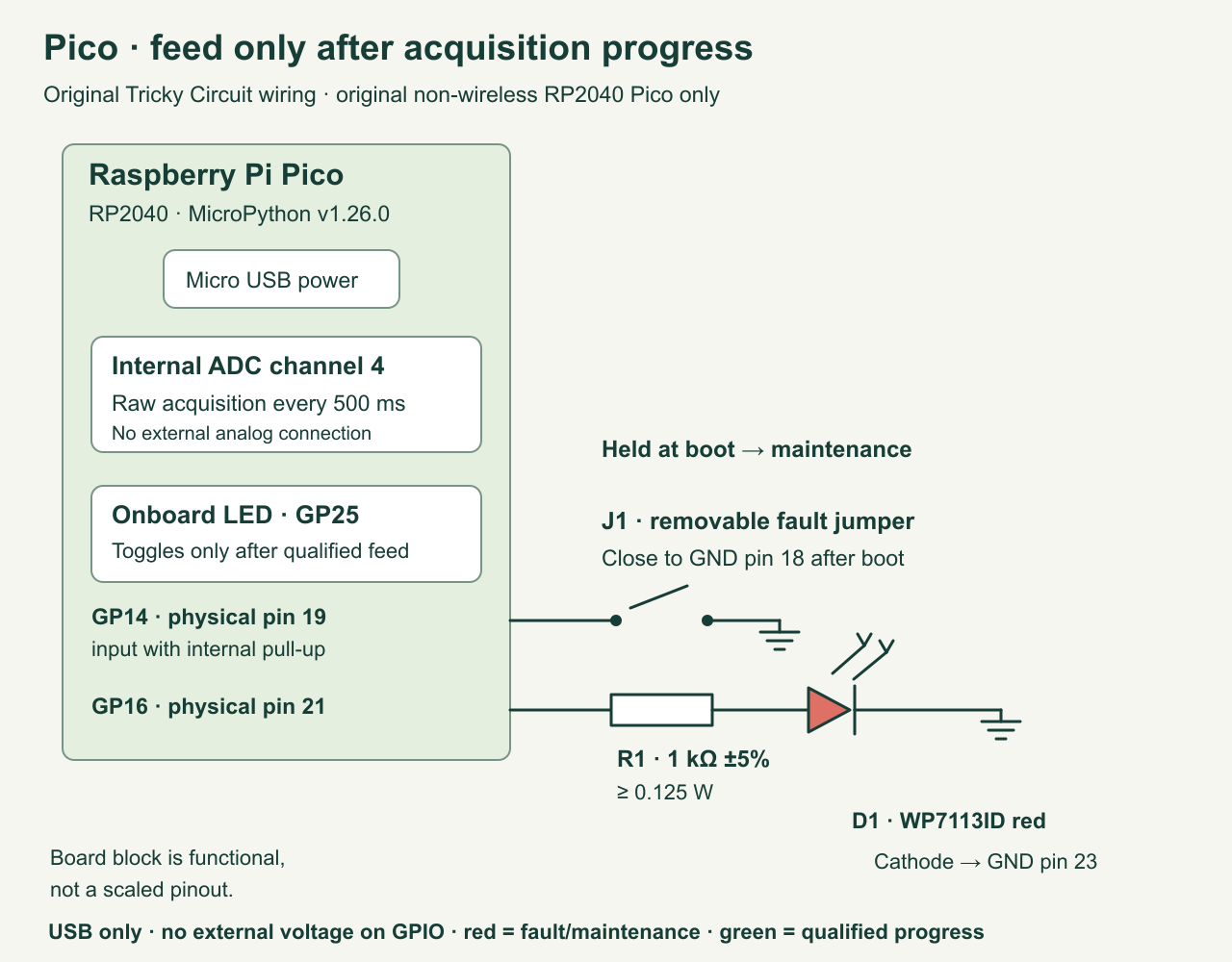
You need that Pico with accessible headers, a data-capable Micro USB cable, a breadboard, one Kingbright WP7113ID red LED, one 1 kΩ resistor, ±5%, at least 0.125 W, and short jumper wires. An LED, or light-emitting diode, passes current mainly in one direction and makes light. Its anode faces the GPIO output through the resistor; its cathode goes to ground. Check the manufacturer’s package drawing rather than relying on a trimmed lead’s length.
| Connection | Purpose |
|---|---|
| GP16, physical pin 21 → 1 kΩ → red LED anode | Fault/maintenance indicator, initially off |
| Red LED cathode → GND, physical pin 23 | Current return to the Pico |
| GP14, physical pin 19 → removable jumper → GND, physical pin 18 | Deliberate fault request, active when connected to ground |
| Onboard LED on GP25 | Qualified acquisition heartbeat; already wired on this board |
| ADC channel 4 inside RP2040 | Acquisition task; no external analog input is connected |
GPIO means general-purpose input/output: a configurable digital pin. GND, or ground, is the shared voltage reference. The GP14 input uses an internal pull-up, a weak connection that makes an open input read high. The jumper grounds it, making it read low. No separate source drives GP14. Do not connect these GPIO signals to USB’s 5 V line or to the board’s power-control pins.
At a nominal 3.3 V output, ignoring the LED’s voltage drop gives a conservative resistor-only current bound of 3.3 V / 1000 Ω = 3.3 mA. At the resistor’s −5% limit, the same bound is 3.3 / 950 = 3.47 mA. Actual LED current is lower because the LED also drops voltage and the output has finite resistance. The resistor-only power bound is 3.3² / 950 = 0.0115 W, comfortably below 0.125 W. These are design calculations, not measured brightness or an exact LED-current guarantee.
Choose deadlines before writing a feed call
The acquisition period is 500 ms. A successful read must finish within an application budget of 100 ms, and its completion must occur before the existing 900 ms freshness deadline. The supervisor checks freshness before starting work and again when work returns. That second check matters: a slow returning function must not erase the evidence that its previous sample already became stale.
The hardware watchdog timeout is 3000 ms. The RP2040 limit exposed by MicroPython v1.26.0 is 8388 ms maximum; do not copy a 10-second timeout from a different board. Creating WDT starts it. Through the documented MicroPython API it cannot subsequently be stopped or have its timeout changed. The Raspberry Pi SDK documents the RP2040-E1 hardware limitation underlying that maximum. This program leaves the normal clock configuration alone. MicroPython WDT reference, Raspberry Pi watchdog reference.
During normal operation a successful read permits one feed, nominally about every 500 ms. The 900 ms freshness limit leaves about 400 ms beyond that nominal period. It is an editorially chosen demonstration budget, not a measured worst-case execution time. The 20 ms sleep is a polling interval; Python execution and other processing can lengthen it. No hard real-time deadline guarantee follows from these numbers.
When the acquisition task stops, the main loop can keep running. It finds the old sample stale and turns the red indicator on. Crucially, it has already refused to feed without a new sequence number. Therefore reset occurs approximately 3000 ms after the last qualifying feed, not 3000 ms after the red LED came on. The freshness threshold controls diagnosis; the hardware timer controls the reset opportunity.
Complete program
Save the following as main.py on the Pico after installing the pinned firmware. Keep an unchanged local copy first. An interactive REPL, or read–evaluate–print loop, lets you enter commands over the USB serial connection. Before arming the watchdog, confirm the firmware banner and import sys; print(sys.implementation) identify the intended MicroPython build. Do not assume a successful host test installed anything on the board.
Supervisor owns the feed policy. completed() validates a returned result and advances its sequence only on success. feed_due() requires a new sequence; fed() consumes it. ticks_ms() is an elapsed-time counter that eventually wraps, so comparisons use ticks_diff() rather than ordinary subtraction. Our short intervals remain within its valid half-period comparison window. MicroPython time reference.
"""Tricky Circuit: original Pico RP2040, MicroPython v1.26.0.

Save as main.py on a spare tabletop Pico only after reading the lesson.
Host tests import this same file; importing does not touch any hardware.
"""

SAMPLE_MS = 500
STALE_MS = 900
READ_BUDGET_MS = 100
WDT_MS = 3000
LOOP_MS = 20
FAULT_MODE = "stall"  # "stall" leaves the loop alive; "block" stops it.


class Supervisor:
    def __init__(self, now, ticks_diff):
        self.diff = ticks_diff
        self.started = now
        self.last_sample = None
        self.sequence = 0
        self.fed_sequence = 0
        self.raw = None
        self.fault = None

    def fail(self, reason):
        # A later successful read cannot erase an already latched fault.
        if self.fault is None:
            self.fault = reason

    def check(self, now):
        reference = self.started if self.last_sample is None else self.last_sample
        if self.diff(now, reference) >= STALE_MS:
            self.fail("STALE")
        return self.fault is None

    def completed(self, raw, elapsed, now):
        self.check(now)
        if self.fault is not None:
            return False
        if type(raw) is not int or not 0 <= raw <= 65535:
            self.fail("VALUE")
        elif elapsed < 0 or elapsed > READ_BUDGET_MS:
            self.fail("SLOW_READ")
        else:
            self.raw = raw
            self.last_sample = now
            self.sequence += 1
        return self.fault is None

    def feed_due(self, now):
        # Merely executing this method is not proof of acquisition progress.
        return self.check(now) and self.sequence > self.fed_sequence

    def fed(self):
        self.fed_sequence = self.sequence


def maintenance(red, green, clock):
    # No watchdog has been created on this boot. Ctrl-C permits file editing.
    green.value(0)
    red.value(1)
    while True:
        clock.sleep_ms(100)


def run(machine_module=None, clock=None, fault_mode=FAULT_MODE):
    if fault_mode not in ("stall", "block"):
        raise ValueError("fault_mode must be stall or block")
    if machine_module is None:
        import machine as machine_module
    if clock is None:
        import time as clock
    m = machine_module
    red = m.Pin(16, m.Pin.OUT, value=0)
    green = m.Pin(25, m.Pin.OUT, value=0)
    inject = m.Pin(14, m.Pin.IN, m.Pin.PULL_UP)
    cause = m.reset_cause()
    if cause == m.WDT_RESET or inject.value() == 0:
        print("MAINTENANCE: reset cause", cause, "GP14", inject.value())
        return maintenance(red, green, clock)
    # This is an editing window on a cold boot, before WDT construction.
    clock.sleep_ms(1500)
    if inject.value() == 0:
        print("MAINTENANCE: GP14 held during startup")
        return maintenance(red, green, clock)
    adc = m.ADC(4)  # RP2040 internal temperature channel; retain raw counts only.
    now = clock.ticks_ms()
    supervisor = Supervisor(now, clock.ticks_diff)
    last_attempt = None
    injected = False
    heartbeat = 0
    watchdog = m.WDT(timeout=WDT_MS)
    # No printing, file writes, network calls or unbounded queues in this loop.
    try:
        while True:
            now = clock.ticks_ms()
            supervisor.check(now)
            if not injected and inject.value() == 0:
                injected = True
            if injected and fault_mode == "block":
                # Intentional fault demonstration: the supervisor cannot run.
                while True:
                    clock.sleep_ms(LOOP_MS)
            due = (last_attempt is None or
                   clock.ticks_diff(now, last_attempt) >= SAMPLE_MS)
            if due and not injected and supervisor.fault is None:
                last_attempt = now
                begin = clock.ticks_ms()
                try:
                    raw = adc.read_u16()
                    end = clock.ticks_ms()
                    elapsed = clock.ticks_diff(end, begin)
                    supervisor.completed(raw, elapsed, end)
                except OSError:
                    supervisor.fail("READ_ERROR")
            now = clock.ticks_ms()
            if supervisor.feed_due(now):
                watchdog.feed()
                supervisor.fed()
                heartbeat ^= 1
                green.value(heartbeat)
            if supervisor.fault is not None:
                green.value(0)
                red.value(1)
            clock.sleep_ms(LOOP_MS)
    finally:
        # Ctrl-C cannot cancel the active hardware watchdog.
        green.value(0)
        red.value(1)


if __name__ == "__main__":
    run()
Only run() accesses hardware, so the same file can be imported by the host tests without changing the computer’s watchdog or pins. The acquisition call is the board API’s single conversion, not a Python loop waiting for a cable event. Each ordinary loop iteration does limited work. The special block injection intentionally violates this rule to demonstrate the independent watchdog.
There are no file writes after startup and no accumulating reading list. The most recent raw result and sequence are kept in memory. The loop also avoids USB printing: a diagnostic output path that blocks indefinitely could itself stop progress. The one maintenance message is printed before a watchdog is created on that boot. This small experiment prioritises visible recovery behavior over a streaming terminal display.
Three tabletop experiments
- Healthy acquisition. Disconnect the fault jumper, power the Pico from USB and let
main.pystart. There is a 1.5-second editing window before arming. The red LED should remain off. The onboard LED should toggle once per qualified acquisition, nominally every 500 ms: one on/off cycle is about one second. Let it run for several watchdog periods and record what you actually see. A continuously lit green LED does not by itself demonstrate health. - Stalled task with a live loop. Leave
FAULT_MODE = "stall". After normal heartbeat begins, connect GP14 to the specified ground pin. The first detected low latches the injection for this boot. The acquisition function stops being called, while the supervisor keeps polling. Expect the heartbeat to freeze briefly, then turn off when freshness fails, with the red LED on. The hardware should reset after its last feed times out. Releasing the jumper before that reset deliberately does not clear the fault. - Entire loop blocked. Recover as described below, change the constant to
"block", then cold-start again without the jumper. Apply the jumper after heartbeat starts. The deliberate inner loop now prevents both acquisition and supervision. Before reset, the onboard LED can remain frozen and the red LED may remain off: software that is no longer executing cannot promise to set its warning output. After reset, the boot check should enter the red maintenance hold.
Use a stopwatch, logic analyser or video only if you have one, and label its observations separately from the nominal calculations. Measure from the last visible qualified heartbeat change to restart, recognising that a light transition and the actual feed are not a precision time reference. USB may disconnect during reset, and a terminal may miss the short boot message. The red hold and absence of rearming are the intended persistent visual observations.
Recovery without a reset storm
On startup the program examines machine.reset_cause(). A watchdog-class result sends it directly to maintenance: red on, heartbeat off, no ADC task and no new WDT instance. This avoids repeatedly resetting into the same bad condition. It requires a person to investigate rather than silently declaring the old reading healthy after a reboot. A GP14 jumper already held during startup enters the same unarmed editing mode even on a cold boot.
To resume the experiment, remove the fault jumper and disconnect USB power, then reconnect it. Do not supply the board through another connector during that power cycle. To edit safely, instead connect the GP14 jumper before applying power; stop the unarmed maintenance loop with Ctrl-C, edit the file and save it, then remove the jumper and cold-start. The BOOTSEL button is a firmware-loading escape if normal serial editing is unavailable; reloading or erasing flash can affect saved files, so retain your local program copy.
Ctrl-C while the watchdog is armed cannot cancel the hardware countdown. The finally block turns green off and red on, but the board may still reset moments later. A soft interpreter restart is not a substitute for this lesson’s cold-start procedure. Do not try to keep a debugging session alive by repeatedly constructing more WDT objects or feeding from an unrelated timer callback.
Reset cause has limited precision. In the reviewed RP2 v1.26.0 source, reset_cause() checks the SDK’s watchdog_caused_reboot(). That also recognises a forced watchdog reboot; machine.reset() itself uses that mechanism. Therefore a WDT_RESET result is a conservative recovery signal, not proof that our particular sensor task stalled. The program does not persist the latched reason across resets. Pinned RP2 reset implementation.
Failures, limits and adaptation
| Condition | Provided behavior |
|---|---|
| Equal but newly acquired raw values | Advance sequence and permit feeds |
| No completed acquisition for 900 ms | Latch STALE; no feed; red on if loop runs |
| Acquisition raises OSError | Latch READ_ERROR; no feed |
| Returned value is outside 0–65535 or is not an integer | Latch VALUE; no feed |
| Read takes more than 100 ms or returns after freshness expires | Latch SLOW_READ or STALE; no feed |
| Unexpected exception or Ctrl-C after arming | Finally sets visible fault outputs; active WDT remains able to reset |
| Watchdog-class reboot or input held at boot | Unarmed maintenance hold; deliberate recovery required |
An OSError is included for adapting the acquisition function to a driver that can report an input/output failure. A missing sensor is not magically fixed by restarting the Pico. A driver with a retry loop must have its own bounded attempts and timeout; feeding inside that retry loop would hide a dead acquisition path. For two required tasks, maintain separate progress counters and freshness budgets, then require both before accepting a new supervision round. Do not declare the application healthy merely because either task progressed.
A watchdog also cannot repair an inadequate power supply, an overvoltage connection, a short circuit, a damaged component or a sensor’s physically incorrect result. A valid-looking but wrong conversion still advances this example. The red LED cannot remain lit with no power. On another project, relays and motors need an independent electrical safe state during reset; this LED experiment does not establish one. No host test certifies oscillator accuracy, USB recovery timing or the actual reset circuitry.
Keep raw observations and measurement validity together when adding this policy to an instrument. The Pico MiniMeter lesson discusses stale displays and invalid conversions. For the broader measurement background, use the site’s existing learning course.
What was checked locally
The companion host validation loads this exact program and substitutes only the hardware interfaces. It checks feeding after real sequence advances, repeated-equal data, missed freshness at a returning read, counter wrap comparisons, invalid/slow/error acquisitions, fault latching, the actual running loop’s two injection paths, watchdog expiry in the mock, boot maintenance and output cleanup. This establishes the program’s decisions under controlled inputs; it does not build a Pico firmware image or execute the board’s ADC and watchdog. Browser layout review is a separate publication gate.
Challenge: Why is a once-per-second timer feed a bad replacement?
If a timer callback feeds every second while the acquisition task is stuck, the hardware never reaches zero. The timer has proved that one callback still runs, not that new readings exist. Keep the feed decision with the supervisor and consume each acquisition sequence at most once. A stable temperature is different: the numeric result may repeat, but a genuinely completed acquisition advances the sequence. For extra practice, design a second required task with its own counter and explain how you would reject old progress from either task.
Primary references
- MicroPython v1.26.0 WDT API: constructor, feed contract and RP2040 maximum.
- MicroPython v1.26.0 RP2 reference: pins and internal ADC channel.
- Pinned RP2 WDT source and reset source: implementation details and broad reset cause.
- Raspberry Pi watchdog documentation: RP2040-E1, timer limits and reset classification.
- Raspberry Pi Pico datasheet and official board documentation: board connections and BOOTSEL recovery.
- Official RPI_PICO firmware archive: select v1.26.0 for this lesson.
- Kingbright WP7113ID specification: LED package and polarity.
Download the experiment sources (ZIP): complete programs, full-size PNG and editable SVG diagrams, and blank worksheets where supplied. The complete article program remains inline above.