Measure the air beside a window and the air farther into the room with one Pico. Two DS18B20 temperature sensors share one data connection, but each keeps its own identity. Warm one sensor, disconnect it and reconnect it: the other channel should keep its name, and a failed reading should leave an empty value with an explanation.
Verification: the calculations, connection list and supplied application have been checked locally with simulated bus transactions. The code has not been executed on a Pico, and the circuit has not been assembled or physically measured. Expected observations below are a procedure for your experiment.
Two locations, one bus, permanent names
A bus is a shared electrical connection used by several devices. 1-Wire is the protocol, or set of communication rules, used here. Its name counts the data conductor; our externally powered circuit also needs ground and power. The Pico is the bus master: it sends commands and chooses which sensor may answer. A sensor is a device that converts a physical quantity into information; these two report their own package temperature.
Each genuine DS18B20 contains a factory programmed 64-bit identification code in ROM, meaning read-only memory. Eight bits make one byte, so the code occupies eight bytes. The first byte is the device-family code, 28 hexadecimal for a DS18B20. The last is a check byte. Hexadecimal writes a byte as two characters from 0–9 and a–f. The code is useful for naming a physical part, but it does not tell us where that part was installed.
The key design choice is to write a deliberate mapping such as reference → the ROM printed for the reference part. We never call the first result of a search “reference.” Search order is an implementation detail; unplugging a part must not rename the remaining one. This is a different experiment from the introductory electronics lessons: the useful outcome is trustworthy channel identity and visible errors, as well as temperature.
Exact parts and their jobs
| Reference | Chosen part | Purpose |
|---|---|---|
| U1 | Original Raspberry Pi Pico with RP2040; fitted headers; MicroPython v1.29.0 RPI_PICO build | Runs the application and supplies the short bench circuit with 3.3 V from its regulator output. |
| U2, U3 | Analog Devices / Maxim DS18B20+, three-lead TO-92 package, two individual parts | Measure two temperatures and provide independent factory identities. This lesson specifies bare parts, not an unidentified waterproof assembly. |
| R1 | 4.7 kΩ, 1%, 0.125 W or greater | Pulls the shared data wire high when every participant releases it. |
| C1, C2 | 100 nF ceramic, 10 V or greater, one beside each sensor | Provide a nearby supply reservoir during changing current demand; connect between each VDD and GND. |
| Other | Breadboard, short wires, USB data cable and two paper labels | Make a short tabletop bus, display serial output and preserve the physical names. |
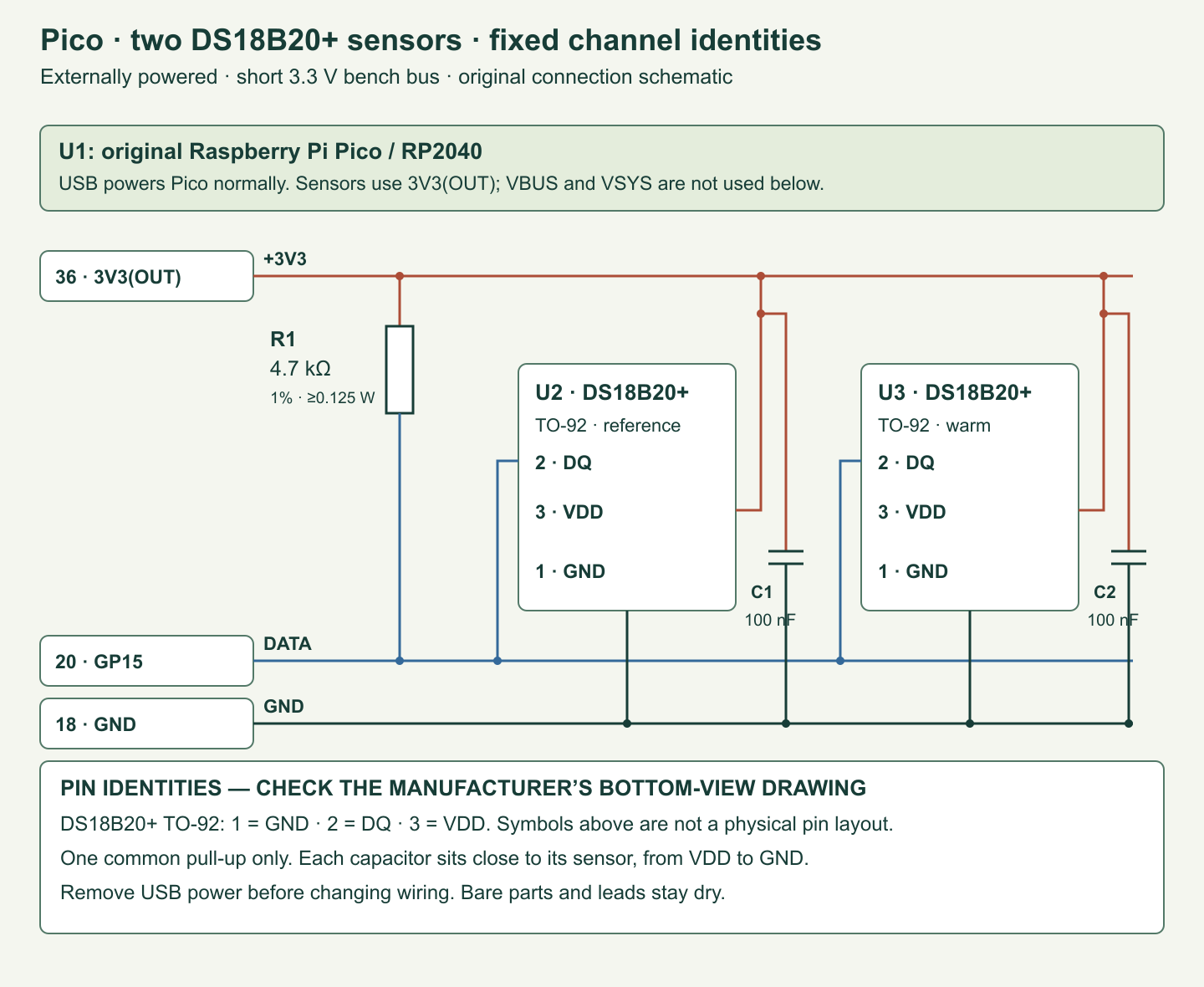
TO-92 names the small three-lead package. The DS18B20 datasheet shows its package drawing from the bottom. Identify pins from that drawing before inserting the part: pin 1 is GND, pin 2 is DQ and pin 3 is VDD. GND is the common voltage reference, DQ is the bidirectional data connection and VDD is the positive supply. The schematic below gives pin numbers and functions so that a mistaken viewing direction does not become the wiring instruction. Do not infer the wire colours of a packaged probe from these bare-part pin numbers.
MicroPython is a version of Python for microcontrollers, small computers that control electronic pins. The named v1.29.0 release is the documented software target, not a statement that a firmware build or board run was performed here. Install the official RPI_PICO firmware, check import onewire in its interactive console, and record the actual version in your experiment notes. Keep the Pico at its normal clock settings for this first trial.
Wire the powered bus
| Net | Connections |
|---|---|
| +3V3 | Pico physical pin 36, 3V3(OUT) → U2 pin 3 and U3 pin 3; R1 upper end; C1 and C2 supply ends. |
| DATA | Pico GP15, physical pin 20 → U2 pin 2 and U3 pin 2; R1 lower end. |
| GND | Pico physical pin 18 → U2 pin 1 and U3 pin 1; C1 and C2 ground ends. |
Disconnect USB power while wiring or changing connections. Start with wires around 10–20 cm, kept close to their ground return. Place C1 directly across U2’s supply pins and C2 across U3’s supply pins. Dots in the schematic mean joined conductors; crossings without dots are separate connections. A decoupling capacitor stores a small local charge and reduces rapid supply changes; it does not repair a missing ground or make a long bus reliable. Breadboard power rails may be split halfway along. Check continuity rather than assuming a stripe is one uninterrupted connection.
Supply both sensors from the Pico’s 3V3(OUT), and pull DATA to that same 3.3 V rail. The DS18B20’s specified local supply range is 3.0–5.5 V; our circuit uses 3.3 V throughout. The −0.5 to +6 V pin ratings are absolute stress limits, not an invitation to operate at those voltages. Leave Pico VBUS and VSYS out of this sensor circuit. A DS18B20’s ability to use a 5 V supply does not make a Pico GPIO input tolerant of a 5 V pull-up.
GPIO means general-purpose input/output, a programmable digital pin. The official OneWire driver switches the pin between pulling low and releasing it. R1 then raises the line. This shared “pull low or release” arrangement lets several devices use the conductor without fighting a push-pull high output. Use the external R1 shown; an unspecified internal pull-up is not a replacement for this design.
Our VDD pins stay connected to the supply. We do not use parasite power, a different arrangement that takes conversion energy from DQ and requires a suitable strong pull-up. The ordinary 4.7 kΩ data resistor is not that strong pull-up. Mixing supply modes would invalidate the wiring and timing assumptions in this lesson. Keep this experiment’s bus dedicated to the two specified DS18B20 parts; the broadcast command is not intended to operate a mixed collection of unknown 1-Wire devices.
What the numbers tell us
When DATA is near zero, the approximate resistor current is I = V / R = 3.3 / 4700 = 0.000702 A, or 0.702 mA. Its dissipation is P = V² / R = 2.32 mW. With a 1% low resistor the zero-volt estimate becomes 0.709 mA. These are calculated values, not measured low-state currents; an actual low output has a small voltage across it. The datasheet’s sensor sink-current specification is 4 mA at a 0.4 V output, so this pull-up places a modest load on a sensor pulling low.
R1 cannot lift a capacitive bus instantaneously. Capacitance is the ability to store charge, contributed here by both inputs and wiring. In a simple resistor-capacitor model, τ = RC is the time constant. An illustrative 100 pF total and 4.7 kΩ give 0.47 µs. Reaching 70% of the final rail takes −RC × ln(0.30) = 0.566 µs. At an illustrative 1000 pF that becomes 5.66 µs. Neither capacitance was measured on this circuit. These examples explain why adding cable changes communication margins; they do not establish a maximum cable length. An oscilloscope and the timing specifications are needed to assess a longer installation.
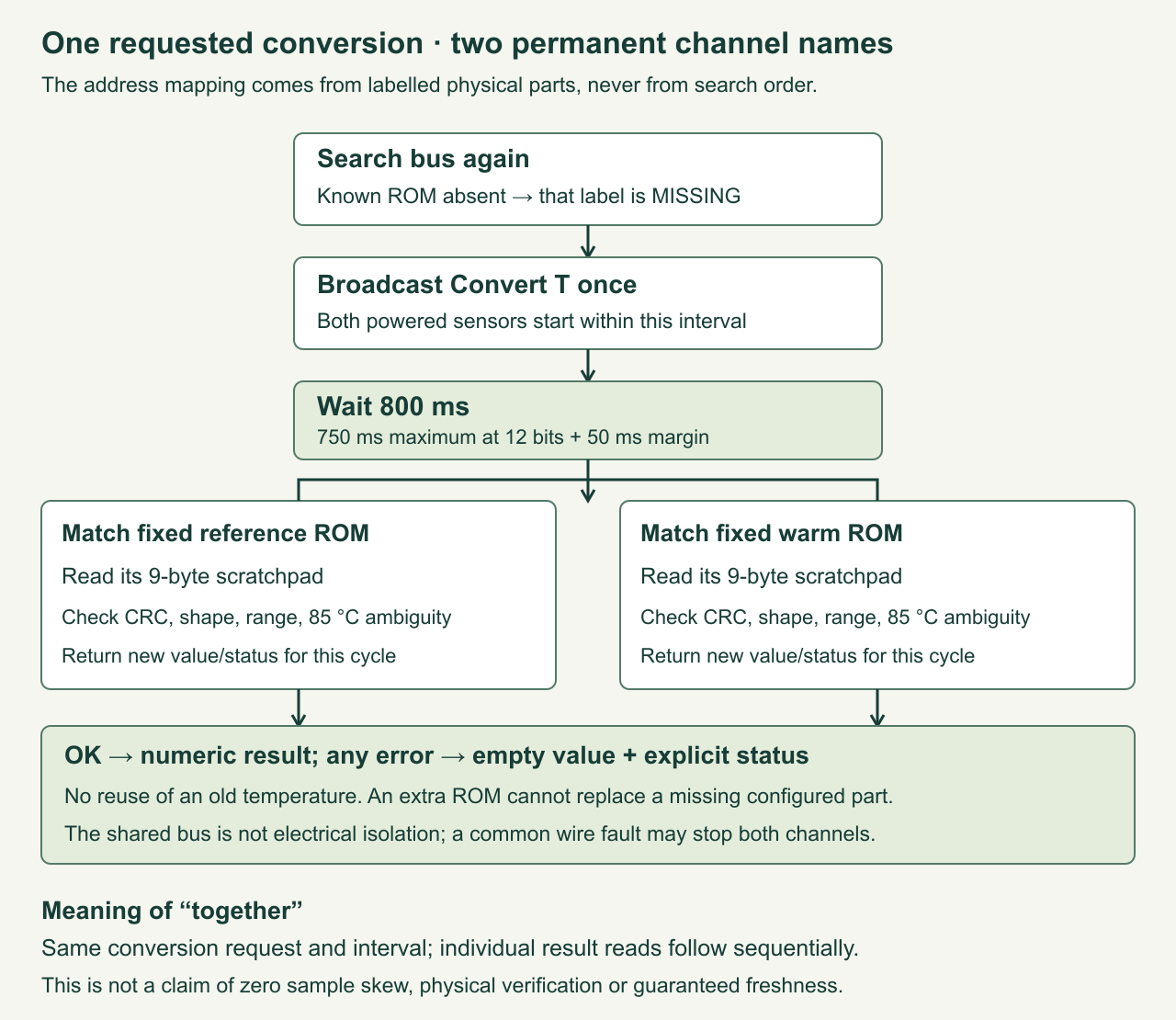
A conversion is the sensor’s process of measuring temperature and writing a digital result. Its maximum time at 12-bit resolution is 750 ms. The application broadcasts one conversion command to both parts, waits 800 ms, then addresses them separately to read their results. Both measure during the same conversion interval; the two read transactions occur one after the other. This is useful for comparing slow room changes but is not a guarantee of perfectly synchronized samples or a replacement for simultaneous high-speed acquisition.
At 12-bit resolution one step is 1/16 °C, or 0.0625 °C. Resolution describes the number spacing; accuracy describes agreement with the physical temperature. The specified sensor accuracy is ±0.5 °C between −10 and +85 °C. Two independent errors at opposite extremes could put their difference 1.0 °C away from the true difference, before placement and thermal-contact effects. Four printed decimal places show the digital steps; they do not create four-decimal accuracy. For our fingertip experiment, watch each trend rather than treating a small offset as proof that one part is wrong.
Name the physical sensors first
- Save the complete file below as
dual_ds18b20.pyon the Pico. Leave both ROM strings empty for discovery mode. - With power removed, connect only U2. Apply power, run the file and copy its complete 16-character DS18B20 ROM. Attach a paper label “reference” to that physical part.
- Remove power, replace U2 with only U3 and repeat. Label this part “warm.” The codes must be different. Do not copy a sample code from another reader.
- Put both actual strings into
LABELS, keeping each next to its physical label. Connect both parts exactly as the schematic shows, then run again.
The program refuses duplicate ROMs, duplicate labels, damaged check bytes and an incorrect family code. That catches editing mistakes before a measurement starts. A ROM check is not proof of authenticity or calibration. Keep the recorded mapping with your build; replacing a sensor is an explicit configuration change. If a new unassigned device appears, it is printed as an unassigned ROM and does not silently take over a channel.
Complete application
CRC means cyclic redundancy check, a calculated check value that helps detect changed bits. The program checks both discovered identifiers and the nine-byte scratchpad, the sensor’s temporary result and configuration memory. It also rejects an all-zero result block even though its CRC remainder is zero. Status words and empty values are deliberate output data, not exceptions to hide.
"""Two externally powered DS18B20+ sensors, original RP2040 Pico.

Designed against MicroPython v1.29.0 RP2. Host tests use the SAME monitor
and decoder with a fake transport; they do not execute GPIO or firmware.
Edit the two empty ROM strings after running once in discovery mode.
"""

LABELS = (("reference", ""), ("warm", ""))
WAIT_MS = 800  # DS18B20 12-bit conversion maximum: 750 ms.


def crc8(data):
    """Dallas/Maxim reflected CRC-8, polynomial x^8+x^5+x^4+1."""
    crc = 0
    for value in data:
        for _ in range(8):
            mix = (crc ^ value) & 1
            crc >>= 1
            if mix:
                crc ^= 0x8C
            value >>= 1
    return crc


def rom_text(rom):
    return "".join("%02x" % b for b in rom)


def valid_rom(rom):
    return len(rom) == 8 and rom[0] == 0x28 and crc8(rom) == 0


def configure(labels):
    """Reject accidental duplicate IDs, family codes and damaged text."""
    result = []
    seen_labels, seen_roms = set(), set()
    if len(labels) != 2:
        raise ValueError("configure exactly two labels")
    for label, text in labels:
        if not label or label in seen_labels or len(text) != 16:
            raise ValueError("two unique labels and 16 hex digits required")
        try:
            rom = bytes(int(text[i:i + 2], 16) for i in range(0, 16, 2))
        except ValueError:
            raise ValueError("ROM contains non-hex characters")
        if not valid_rom(rom) or rom in seen_roms:
            raise ValueError("ROM family/CRC invalid or duplicate ROM")
        seen_labels.add(label)
        seen_roms.add(rom)
        result.append((label, rom))
    return tuple(result)


def decode_scratch(data):
    """Return (temperature or None, status); never recycle an older value."""
    if len(data) != 9:
        return None, "INVALID_DATA"
    if crc8(data):
        return None, "CRC_ERROR"
    # These reserved bytes distinguish a DS18B20 scratchpad from all-zero
    # electrical failure data, which happens to have a zero CRC remainder.
    if data[5] != 0xFF or data[7] != 0x10 or (data[4] & 0x9F) != 0x1F:
        return None, "INVALID_DATA"
    raw = data[0] | (data[1] << 8)
    resolution = (data[4] >> 5) & 3  # 0,1,2,3 -> 9,10,11,12 bits.
    raw &= ~((1 << (3 - resolution)) - 1)
    if raw & 0x8000:
        raw -= 65536
    value = raw / 16.0
    if not -55 <= value <= 125:
        return None, "OUT_OF_RANGE"
    if value == 85.0:
        # 85 C is also the power-up register value. This conservative lesson
        # flags ambiguity; an actual 85 C measurement is possible.
        return None, "POWERUP_SUSPECT"
    return value, "OK"


class WireBus:
    """Small transport around the official onewire module, standard speed."""
    def __init__(self, ow):
        self.ow = ow

    def scan(self):
        return self.ow.scan()

    def convert(self):
        self.ow.reset(True)
        self.ow.writebyte(0xCC)  # Skip ROM: both devices hear this command.
        self.ow.writebyte(0x44)  # Convert T: start the measurement together.

    def read_scratch(self, rom):
        self.ow.select_rom(rom)  # Reset + Match ROM in official driver.
        self.ow.writebyte(0xBE)  # Read Scratchpad.
        data = bytearray(9)
        self.ow.readinto(data)
        return data


class Monitor:
    def __init__(self, bus, labels, sleep_ms):
        self.bus, self.labels, self.sleep_ms = bus, labels, sleep_ms
        self.extras = ()

    def rows(self, statuses):
        return [(label, rom_text(rom), value, status)
                for (label, rom), (value, status) in zip(self.labels, statuses)]

    def sample(self):
        self.extras = ()
        try:
            found = tuple(bytes(rom) for rom in self.bus.scan())
            if any(len(rom) != 8 or crc8(rom) for rom in found):
                raise ValueError("invalid scan ROM")
        except Exception:
            return self.rows([(None, "SCAN_ERROR")] * len(self.labels))
        present = [rom in found for _, rom in self.labels]
        self.extras = tuple(rom_text(rom) for rom in found
                            if rom not in [r for _, r in self.labels])
        statuses = [(None, "MISSING") for _ in self.labels]
        if not any(present):
            return self.rows(statuses)
        try:
            self.bus.convert()
        except Exception:
            return self.rows([(None, "CONVERT_ERROR" if p else "MISSING")
                              for p in present])
        self.sleep_ms(WAIT_MS)
        for i, (_, rom) in enumerate(self.labels):
            if present[i]:
                try:
                    statuses[i] = decode_scratch(self.bus.read_scratch(rom))
                except Exception:
                    statuses[i] = None, "READ_ERROR"
        return self.rows(statuses)


def main():
    from machine import Pin
    import onewire
    import time
    bus = WireBus(onewire.OneWire(Pin(15)))
    if any(not text for _, text in LABELS):
        print("DISCOVERY ONLY: power off; connect one sensor; run again.")
        for rom in bus.scan():
            if valid_rom(rom):
                print("DS18B20 ROM", rom_text(rom))
            else:
                print("Other/invalid ROM", rom_text(rom))
        print("Label both physical parts, then edit LABELS. No readings yet.")
        return
    monitor = Monitor(bus, configure(LABELS), time.sleep_ms)
    print("cycle,label,rom,temperature_c,status")
    cycle = 0
    while True:
        cycle += 1
        for label, rom, value, status in monitor.sample():
            text = "" if value is None else "%.4f" % value
            print("%d,%s,%s,%s,%s" % (cycle, label, rom, text, status))
        if monitor.extras:
            print("UNASSIGNED ROMS:", monitor.extras)
        time.sleep_ms(1200)  # 800 + 1200 ms plus transaction time per cycle.


if __name__ == "__main__":
    main()
The application prints cycle,label,rom,temperature_c,status. A cycle number groups the two results from one requested conversion. It is not a date or a guaranteed sampling timestamp. The 800 ms wait and 1200 ms pause produce a period slightly longer than two seconds once search, reading and printing are included. The decoder honours the resolution bits in the returned configuration, masks undefined low bits at reduced resolutions, and never writes the sensor’s nonvolatile settings.
The transport uses the official onewire module for timed signalling. Its select_rom() operation resets the bus and selects the addressed device; our code then asks for its scratchpad. The Monitor class is the actual application logic used by the tests. It searches again each cycle to detect absent parts, starts only one broadcast conversion, and preserves each label when search order changes. This intentionally favours readable diagnostics over maximum sample rate.
What an error means
| Status | Interpretation and next step |
|---|---|
| OK | A correctly shaped, CRC-valid result in the device range. It can still have measurement error. |
| MISSING | The configured ROM was not found. Check that particular part and its connections. |
| SCAN_ERROR | The search failed or returned a damaged ROM. Both channels are untrusted for this cycle. |
| CONVERT_ERROR | The shared command transaction failed. Present channels get an empty result; an already missing channel stays MISSING. |
| READ_ERROR / CRC_ERROR | The addressed transaction failed, or the received scratchpad check failed. Inspect wiring and noise; the other channel may still produce an OK result. |
| INVALID_DATA / OUT_OF_RANGE | The scratchpad shape, reserved bits or numeric range are incompatible with this exact device. Inspect the part identity, supply and transport. |
| POWERUP_SUSPECT | The result is exactly 85 °C, also the temperature register’s reset value. Investigate a possible reset during conversion. |
The 85 °C rule is deliberately conservative: 85 °C can also be a real temperature, so the program would suppress a legitimate reading there. This room-temperature lesson does not heat parts to resolve that ambiguity. More fundamentally, a CRC-valid value can be stale. A software command and delay cannot prove that a sensor stayed powered throughout a conversion. This monitor reports useful evidence and known ambiguity; it is not a safety controller or a freshness guarantee under every possible electrical failure.
The two channels share power, ground and data. A loose data lead on one sensor may affect only that address, but a short on the common DATA rail can stop both. Separate channel names do not provide electrical isolation. Remove power before investigating a suspected short. Do not create failures by shorting 3.3 V to ground, and do not insert bare leads into liquids.
Run three experiments
- Identity: place the two labelled packages together away from the Pico regulator and your hands. Record ten cycles. Gently hold only “warm” between dry fingertips. Its trend should rise while “reference” changes less. Release it and watch the response. Write down actual observations, including the ROMs and ambient conditions.
- One missing channel: remove USB power, disconnect U3 completely and restore power. The warm label should report MISSING; reference should keep its original ROM. Power down, restore U3 and rerun. Its reading should return under the same name. Rebooting is part of this controlled experiment; powered hot-plugging is not required.
- Shared-wire failure: remove power, disconnect GP15 from DATA and restore power. Both channels should lose valid readings. A floating Pico input can produce a failed search rather than one particular guaranteed status. Power down, restore the link and check recovery. Record the status actually observed instead of rewriting it to match an expectation.
For a comparison experiment, attach the two bare packages side by side to the same dry surface using the same method, allow them to settle, then exchange their positions. A persistent difference that follows a package suggests a sensor offset; a difference that follows the position suggests a real temperature gradient or mounting effect. This does not replace calibration against a suitable reference. Avoid the misleading assumption that two digital sensors always read exactly the same value.
Checks completed here and checks still owed
The local test suite executes this exact decoder, configuration parser, monitor and transport using controlled bytes and injected exceptions. It checks negative temperatures, zero, reduced resolutions, bad CRC, all-zero data, fixed labels when search order reverses, disappearing and returning parts, an extra unassigned sensor, independent read faults and conversion failure. It also checks that the 800 ms delay occurs before either addressed read. These are host-side software tests; they do not test the timing of the native OneWire implementation on RP2040.
Your hardware record should include the supply measured at each sensor, resistor value, actual board and firmware version, wire lengths, discovered ROMs, physical positions and recovery results. For longer cables, add measurements of the data waveform at the farthest device. Do not extrapolate a working breadboard into a whole-house bus without those checks. The supplied connection list and editable schematic remain available for review before building.
Challenge: can the warmer channel take over?
Suppose reference disappears and a third DS18B20 is connected. Should the application automatically use the new sensor as reference? Predict the output, then inspect the mapping and search code.
Show the answer
No. The configured reference ROM remains MISSING. The third ROM is printed as unassigned and cannot take over. Automatic substitution would erase the link between a channel name and a physical location. To replace a failed part, identify and label the new part deliberately, update the mapping and record the replacement. A database or display built later should preserve that maintenance event rather than pretending the sensor never changed.
Primary references
- Analog Devices / Maxim DS18B20 datasheet, 19-7487 Rev 6, July 2019: exact package, local power, temperature format, timing, commands and CRC. The product page still points to this revision when reviewed on 16 October 2026.
- Manufacturer’s DS18B20 product and documentation page: device identity, packages and current documentation. No separate device errata link was found there in this review; that does not prove none can exist.
- Raspberry Pi Pico datasheet: original board, pin functions, supply output and electrical constraints.
- MicroPython v1.29.0 RP2 OneWire reference and official Pico firmware downloads: target release and supported interface.
- Official OneWire implementation and DS18x20 driver implementation: selection, conversion and scratchpad/CRC behaviour reviewed for the transport. Our included application is original project code, not a copy of those drivers.
Download the source package (ZIP): complete programs, full-size PNG and editable SVG diagrams, and the logger’s host tests. The same complete article program is included above.