Four push buttons make a useful little control panel. Put them in a two-row, two-column matrix and you can also build a surprisingly clear experiment: hold three buttons, and the electrical scan can report a fourth button that nobody pressed. We will make that ghost appear, trace its path and write a scanner that refuses the ambiguous result.
Verification status: this design and the complete program have been checked locally with a host electrical-connectivity model and software tests. It has not been assembled or executed on a Pico. All timing and current figures below are calculations or selected program settings, not bench measurements. Physical testing, target execution and browser review remain separate checks.
One matrix, two different problems
A button matrix connects switches between row wires and column wires. The program selects one row at a time and reads the columns to find closed switches on that row. A complete reading of both rows is a frame. This is a scanning experiment rather than a pin-saving necessity: a 2×2 matrix uses four signal pins, exactly as four direct button inputs would. Bigger matrices can save pins; the small one makes every unintended current path visible.
Contact bounce is the brief sequence of openings and closings caused by a mechanical contact settling. Ghosting is different: several genuinely closed switches create an indirect electrical path that looks like another closed switch. Waiting longer can help with bounce. It cannot reveal which of two physically different switch combinations produced an identical stable frame.
This lesson therefore separates two decisions. First, reject the electrically ambiguous rectangle immediately. Second, accept an ordinary frame only after that entire frame has stayed unchanged for at least 20 ms of observed scans. During SETTLING and GHOST, the public accepted-key set is empty. This conservative demonstration can temporarily drop a held key while another key changes; it does not retain a previous “good” key as if it remained freshly confirmed.
Board and parts
Use the original, non-wireless Raspberry Pi Pico with RP2040 and the official RPI_PICO MicroPython v1.26.0 firmware image. MicroPython is the small Python interpreter running on the microcontroller, the computer chip on the board. This is a pinned reference version, not a statement that it is the latest available release. The onboard indicator in this example is the original Pico’s GP25 LED; wireless Pico boards use a different arrangement.
Prepare four normally-open, momentary SPST switches, two 10 kΩ, ±1%, at least 0.125 W resistors, a breadboard, short insulated jumpers and a data-capable Micro USB cable. SPST means single-pole single-throw: one contact either joins two terminals or leaves them disconnected. Here “normally open” means disconnected when released. No diode or external power source belongs in this version.
If your tactile push button has four legs, do not guess which legs form the switched contact. Two legs can already be permanently joined inside the package. With all power removed, use a continuity meter to identify one terminal from each switched side, following that exact switch’s drawing. Four two-terminal normally-open switches are the electrical requirement; a four-leg package still represents one contact, not two independent buttons. Check breadboard row connections too.
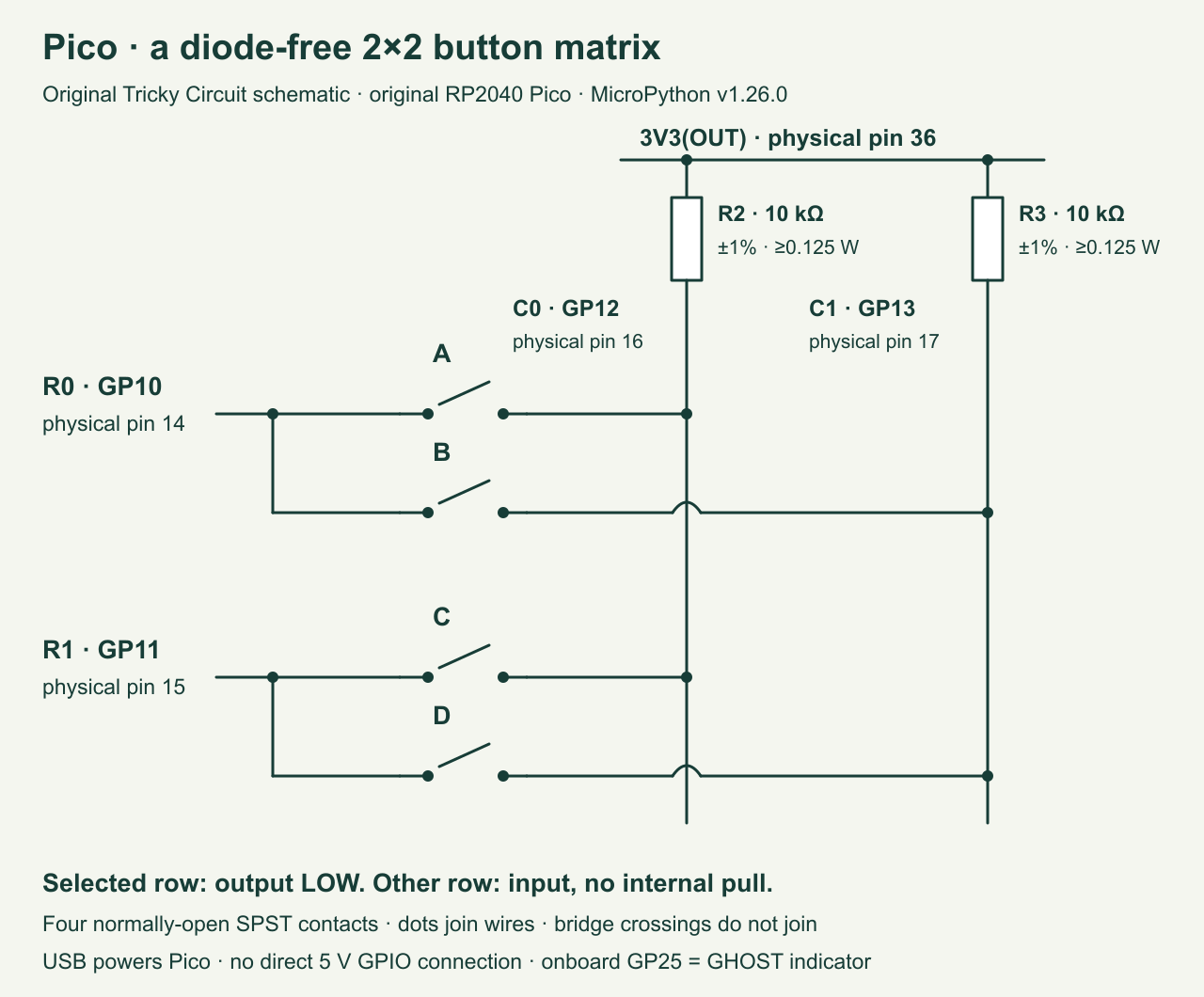
| Net | Exact Pico connection | Connections elsewhere |
|---|---|---|
| R0 | GP10, physical pin 14 | One side of A and B |
| R1 | GP11, physical pin 15 | One side of C and D |
| C0 | GP12, physical pin 16 | Other side of A and C; lower end of resistor R2 |
| C1 | GP13, physical pin 17 | Other side of B and D; lower end of resistor R3 |
| 3V3 | 3V3(OUT), physical pin 36 | Upper ends of both 10 kΩ resistors |
| Onboard indicator | GP25, already wired on the original Pico | On for observed GHOST, off for ordinary states |
GPIO means general-purpose input/output, a pin whose digital role the program chooses. A pull-up resistor weakly connects a column to the board’s 3.3 V supply, making an ungrounded column read high. A selected row drives low and can pull a connected column down. Both resistors go to 3V3(OUT), not VBUS, VSYS, 3V3_EN or a separate battery. USB powers the board and supplies the common ground reference internally.
Why inactive rows must be inputs
The selected row is an output set to zero. Every other row is an input with its internal pull resistors disabled. Such an input presents a high-impedance connection: it observes voltage while drawing very little current. It can still become part of a ghost path through closed switches, but it does not actively drive the line high or low.
Never replace the inactive input with a high output. If two switches connect one column to both rows, a high row output and a low row output would then oppose each other through the contacts. The pull-up resistors are on the columns and do not limit this direct output-to-output path. Releasing every row before selecting another is part of the scanner’s electrical policy, not simply a software style preference.
At a nominal 3.3 V, one 10 kΩ pull-up supplies at most 0.33 mA when pulled to ideal ground. With both resistors at their −1% tolerance, the two-column sum is 2 × 3.3 / 9900 = 0.667 mA. Per-resistor dissipation is at most 3.3² / 9900 = 1.10 mW under this nominal-supply calculation. A 0.125 W resistor has ample margin. Actual low-level voltage reduces the current somewhat.
The RP2040 datasheet’s Table 625 specifies, at 3.3 V I/O supply, input low up to 0.8 V and input high from 2.0 V. Its maximum low output is 0.5 V at the listed drive-strength load, including the nominal 2 mA setting. This circuit’s calculated load is below 2 mA, leaving a 0.3 V low-level budget before switch and wire drops. These are operating logic levels; absolute-maximum pin-voltage limits are not a recommended signal range. Keep the wiring short and check actual levels if results are unreliable. RP2040 datasheet, electrical characteristics.
Trace the ghost before rejecting it
Label A at R0–C0, B at R0–C1, C at R1–C0 and D at R1–C1. Hold A, B and C, leaving D released. When R0 is selected low, A pulls C0 low and B pulls C1 low: that row truthfully looks like both keys. When R1 is selected low, C pulls C0 low. However, the closed A and B contacts connect C0 through the unselected R0 wire to C1. C1 now also reads low, so the second row appears to contain C and D.
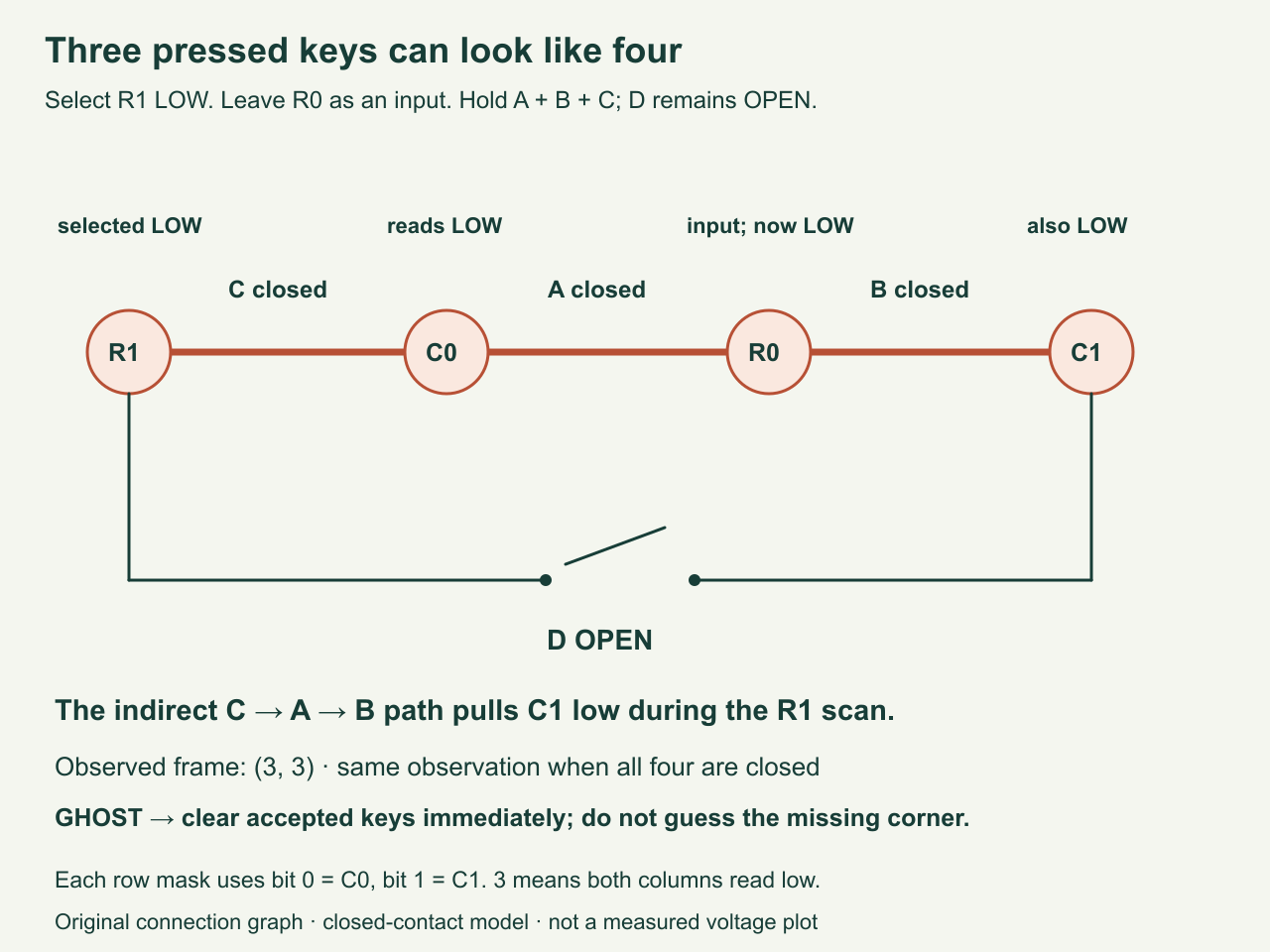
For each row we encode low columns in a two-bit mask: C0 contributes 1 and C1 contributes 2. Thus 0 means neither column, 1 means C0, 2 means C1 and 3 means both. The three-button case yields frame (3, 3). Closing all four buttons produces exactly the same frame. No amount of debouncing can distinguish these two states from these observations alone.
For this exact 2×2 wiring, (mask0 & mask1) == 3 detects the ambiguous full rectangle. The ampersand is bitwise AND: a bit stays set only if both row masks contain it. We call that observation GHOST and expose no accepted keys, including when all four buttons really are pressed. It means “cannot safely distinguish,” not “we know D is false.” The four different three-corner combinations all have the same limitation.
All zero-, one- and two-button combinations can be identified in the ideal static connection model. That does not prove that a disconnected cable, incorrect switch wiring or a shorted column is diagnosed. A column short to ground could imitate keys without producing the full rectangle. This project teaches one specific ambiguity; it is not a complete supervised wiring alarm.
Complete scanner and frame filter
Save this program as main.py on the Pico after installing the pinned firmware. Keep an original local copy. The REPL, or read–evaluate–print loop, is the interactive Python prompt available through USB serial. Confirm the firmware banner first. The code does not install firmware or modify the host computer’s GPIO when imported for tests.
scan_frame() releases the rows, selects one low row, allows 100 μs for electrical settling and reads both columns. It then releases that row before selecting the next. The finally block releases both rows even if a column read or an interruption aborts the scan. Pin.IN with pull=None disables internal pulls; value=0 gives the selected output its initial low value. The reviewed RP2 implementation sets that value before enabling output. MicroPython v1.26.0 Pin API, pinned RP2 implementation.
"""Original Pico RP2040 / MicroPython v1.26.0, diode-free 2x2 matrix.

Rows GP10/GP11, columns GP12/GP13 with external 10k pull-ups to 3V3.
Importing this file on a host does not access hardware.
"""

SETTLE_US = 100
DEBOUNCE_MS = 20
LOOP_MS = 5
KEYS = (("A", "B"), ("C", "D"))


def release_rows(rows, Pin):
    for row in rows:
        row.init(mode=Pin.IN, pull=None)


def scan_frame(rows, columns, Pin, clock):
    """Return two column bit masks, never drive a row high."""
    if len(rows) != 2 or len(columns) != 2:
        raise ValueError("This lesson requires exactly two rows and columns")
    masks = []
    try:
        release_rows(rows, Pin)
        for row in rows:
            # RP2 sets value=0 before changing the pin direction to OUT.
            row.init(mode=Pin.OUT, pull=None, value=0)
            clock.sleep_us(SETTLE_US)
            mask = 0
            for index, column in enumerate(columns):
                if column.value() == 0:
                    mask |= 1 << index
            masks.append(mask)
            row.init(mode=Pin.IN, pull=None)
        return tuple(masks)
    finally:
        # Applies after read errors, Ctrl-C and normal scans alike.
        release_rows(rows, Pin)


class FrameFilter:
    def __init__(self, ticks_diff):
        self.diff = ticks_diff
        self.candidate = None
        self.since = None
        self.state = "SETTLING"
        self.accepted = ()

    def update(self, frame, now):
        if (len(frame) != 2 or
                any(type(mask) is not int or not 0 <= mask <= 3
                    for mask in frame)):
            self.accepted = ()
            self.candidate = None
            self.since = None
            self.state = "FAULT"
            raise ValueError("invalid 2x2 frame")
        if (frame[0] & frame[1]) == 3:
            # Three corners and all four closed switches look identical.
            self.state = "GHOST"
            self.accepted = ()
            self.candidate = None
            self.since = None
        elif frame != self.candidate:
            self.candidate = frame
            self.since = now
            self.state = "SETTLING"
            self.accepted = ()
        elif self.diff(now, self.since) >= DEBOUNCE_MS:
            self.state = "OK"
            self.accepted = tuple(KEYS[r][c] for r in range(2)
                                  for c in range(2) if frame[r] & (1 << c))
        return self.state, self.accepted


def run(machine_module=None, clock=None, emit=print):
    if machine_module is None:
        import machine as machine_module
    if clock is None:
        import time as clock
    Pin = machine_module.Pin
    rows = tuple(Pin(n, Pin.IN, pull=None) for n in (10, 11))
    columns = tuple(Pin(n, Pin.IN, pull=None) for n in (12, 13))
    led = Pin(25, Pin.OUT, value=0)
    filt = FrameFilter(clock.ticks_diff)
    last = None
    try:
        while True:
            frame = scan_frame(rows, columns, Pin, clock)
            state, keys = filt.update(frame, clock.ticks_ms())
            led.value(1 if state == "GHOST" else 0)
            report = (frame, state, keys)
            if report != last:
                # Rows are already released before output can block.
                emit("raw=%d,%d state=%s keys=%s" %
                     (frame[0], frame[1], state, ",".join(keys) or "-"))
                last = report
            clock.sleep_ms(LOOP_MS)
    except Exception:
        led.value(1)
        raise
    finally:
        release_rows(rows, Pin)


if __name__ == "__main__":
    run()
FrameFilter remembers a candidate frame and when it was first observed. Every change empties the accepted keys and starts a fresh 20 ms interval. A GHOST result also forgets the candidate immediately, so removing one ghost-producing key does not instantly restore an older accepted state. A new ordinary frame must pass the whole settling interval again. Empty-frame release uses the same rule, although the accepted set has already been cleared during settling.
The time counter wraps eventually, so elapsed comparisons use ticks_diff() rather than direct subtraction. A nominal scan includes two 100 μs settling delays, then the loop requests a 5 ms sleep. Ignoring Python and serial overhead gives about 5.2 ms per loop. An ordinary change therefore needs several observed frames to pass 20 ms. These are not exact scan-rate or response-time guarantees; USB output, interpreter work and switch behavior can lengthen them.
Build and test a visible ambiguity
- Check the contacts without power. Confirm each button joins only its intended row and column when held. Confirm the two pull-ups reach 3V3(OUT), with no accidental row-to-row connection. Then connect USB and run the program.
- Press one key at a time. A should settle to raw
1,0; B to2,0; C to0,1; D to0,2. Watch SETTLING expose no keys before OK names the held key. Releases should also settle to0,0. If single keys do not match, repair the wiring before exploring combinations. - Try the six two-key combinations. Include same-row A+B, same-column A+C and diagonal A+D. These should each give their corresponding two accepted keys once stable in the static model. A column bit belonging to both rows is not automatically a ghost: the complete shared two-column rectangle is the criterion here.
- Hold A+B+C with D released. The raw frame should show
3,3; the state should be GHOST; accepted keys should be empty; the onboard light should turn on. Release everything, then repeat with the other three-corner combinations. Do not change any row to a high output to “fix” the result. - Add D as a fourth press. Observe that raw data remains
3,3. The program continues rejecting the ambiguous frame. Now release B, leaving A+C+D: it remains a three-corner ambiguity. Release D too, leaving A+C, and observe a fresh settling interval before those two keys return.
The raw field deliberately displays what was scanned, even when keys are rejected. Application actions must use only the accepted keys when state is OK; feeding raw masks into a command handler would bypass the protection. Do not attach this demonstration directly to an actuator or a password entry workflow. Its output is educational terminal text and an onboard indicator.
What filtering cannot know
The scanner reads rows at different moments. If switches change during a frame, the combined frame may not represent any single instantaneous switch state. Requiring a stable frame over time helps with ordinary contact transitions, but it does not reconstruct the exact order of fast actions. The 100 μs settle delay is a starting setting for short tabletop wires, not an experimentally established maximum cable length or capacitance budget.
A keypad needing arbitrary simultaneous presses needs a different electrical design. One diode per switch can restrict indirect current paths, but a real upgrade must specify diode polarity, forward drop at the actual current, leakage, input thresholds and temperature limits. Merely adding any familiar diode does not prove adequate low-level margin. This lesson deliberately keeps all switches diode-free so that the ambiguity and conservative rejection remain reproducible.
For a practical four-button panel, direct individual inputs are often easier to explain and diagnose. The matrix is valuable here because its graph is small enough to reason about completely. Larger matrices need a detector appropriate to their dimensions; copying this two-row/two-bit formula into a bigger keyboard is not a complete rollover policy. Rollover describes which simultaneous key combinations can be recognised; it depends on the circuit and scanner together.
A pin configuration API cannot protect against every physical fault. The cleanup code assumes the board can still execute and the Pin operations work. Loss of power, a reset during an output slot or damaged wiring requires hardware analysis beyond a Python finally block. For ordinary read exceptions, the supplied scanner does release its rows before the program reports the failure. Serial output occurs only after scan cleanup, so a slow terminal does not intentionally leave a row actively selected.
The site’s learning course provides supporting circuit basics. The Schmitt-trigger button lesson treats a different problem: conditioning one contact and understanding hysteresis.
Local evidence and a challenge
The companion validator tests the actual scanner against an undirected electrical graph for all sixteen physical switch subsets. For each selected row, it finds which column nodes are connected through closed contacts to the active low output. It also checks that there is never an actively driven high row and that every exit releases the row pins. The filter tests cover unchanged frames, bounce, ghost entry, fresh recovery, bad frames and a wrapping clock. These are host checks, not a firmware build, actual switch-waveform capture or Pico execution.
Challenge: Could you recover the real three keys by trusting the previous frame?
Sometimes a previous ordinary frame gives a plausible story, but it cannot prove the present state. The user may have changed several keys between scans. A stable (3,3) observation could mean any three corners or all four keys. Guessing from history turns an explicit ambiguity into an invented key set. This demonstration rejects it, clears old accepted keys and requires a new stable ordinary frame. Design a different application policy only after deciding which lost or false actions it can tolerate.
Primary references
- RP2040 datasheet, build 2025-02-20, Table 625 and the following explanation of GPIO drive strength: operating digital levels and load conditions.
- Original Pico datasheet: board pinout, physical pin numbering and power connections.
- MicroPython v1.26.0 Pin documentation and RP2 source at v1.26.0: input mode, disabled pulls and initial output value.
- MicroPython v1.26.0 time documentation: delays and wrap-aware counters.
- Official RPI_PICO firmware archive: select the version used in this lesson.
Download the experiment sources (ZIP): complete programs, full-size PNG and editable SVG diagrams, and blank worksheets where supplied. The complete article program remains inline above.