A room-status panel should keep showing its previous complete pattern while the controller prepares the next one. An eight-bit shift register with a separate storage register can do exactly that. In this experiment, a Pico spends several seconds shifting a new byte while the existing light-emitting diodes (LEDs) stay unchanged. One later clock edge commits the new display. Then we deliberately latch at the wrong time and discover what the separate register was protecting us from.
The exact device is the Texas Instruments SN74HC595N, in its 16-pin plastic dual-inline package, abbreviated PDIP; N identifies that package. A register is a small bank of stored binary values. The chip has two eight-bit banks: the shift register accepts one bit at a time, and the storage register holds the pattern that feeds the output drivers. A bit is one binary 0 or 1; eight bits form a byte. This is a practical staged-update experiment, rather than another binary-counter display.
Three operations that look similar but do different jobs
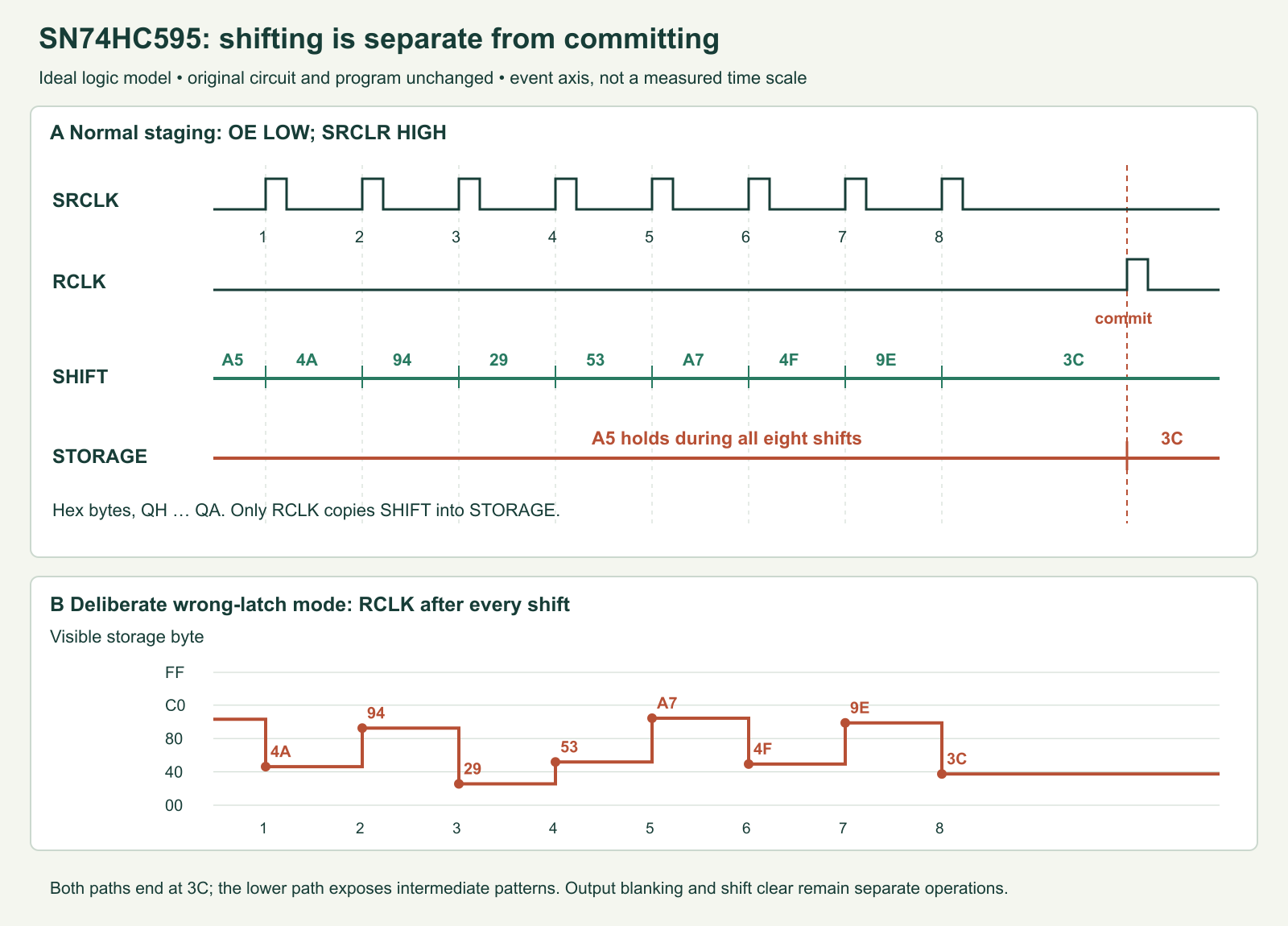
Shifting moves the incoming bit into QA’s position and moves existing bits toward QH. It happens on a rising edge of SRCLK, the shift-register clock. A rising edge is a low-to-high transition; merely leaving a clock high does not generate more edges. Latching, the usual informal name for this device’s commit operation, copies the shift register into storage on a rising edge of RCLK. The storage register is edge-triggered, not a transparent latch that follows data for as long as RCLK is high.
Output enable, abbreviated OE, controls whether the parallel output drivers are connected. OE is active low: low enables the outputs and high makes them high impedance. High impedance means the driver largely releases the pin; it does not actively drive zero. With our resistor-and-LED branches to ground, releasing the outputs removes their normal source current, so the LEDs go dark. Blanking does not erase either register.
The active-low shift-register clear input, SRCLR, clears the shift bank only. Some drawings call it MR, or master reset, but that name can mislead: pulling this pin low does not reset the storage register. A previously lit panel can remain lit after SRCLR. It changes to zero only after the cleared shift bank is clocked into storage, or becomes dark when OE disables the output drivers.
Exact parts, version and startup bias
Use an original non-wireless Raspberry Pi Pico, RP2040, with official RPI_PICO MicroPython v1.26.0. This is a pinned documented version, not a claim that it is the newest release. MicroPython is a Python interpreter for microcontrollers; the original Pico is the board intended by the physical pin numbers below. Power it through the Micro USB connector; USB stands for Universal Serial Bus. The chip and Pico share the Pico’s 3.3 V output; no separate 5 V logic supply is used.
| Reference | Part/value | Purpose |
|---|---|---|
| U1 | TI SN74HC595N, N PDIP-16 | Two-register serial-to-parallel output device. |
| U2 | Original Raspberry Pi Pico RP2040 | Runs the supplied bit-by-bit program at 3.3 V logic. |
| D1–D8 | Eight Kingbright WP7113ID red LEDs | Low-current visible output panel. |
| R1–R8 | 1.5 kΩ, ±5%, ≥0.125 W, one per LED | Restrict each branch current independently. |
| R9, R10 | 10 kΩ, ±5%, ≥0.125 W | Pull OE and SRCLR to 3.3 V before software configures the pins. |
| R11–R13 | 100 kΩ, ±5%, ≥0.125 W | Pull SER, SRCLK and RCLK to ground while their controller pins are inputs. |
| C1, C2 | 100 nF and 1 µF X7R ceramic, ≥10 V | Local supply bypass near U1 pins 16 and 8. |
| Assembly | Breadboard, short wires, data-capable USB cable | Keep clock, power and return paths short. |
X7R identifies a ceramic capacitor temperature class. The 100 nF capacitor equals 0.1 µF: nanofarads (nF) and microfarads (µF) express capacitance. These parts supply brief local current changes and keep the supply connection short at the chip.
A pull-up is a resistor that gives an otherwise undriven signal a high default level; a pull-down does the same toward ground. R9 is essential to the startup policy: firmware cannot hold OE high during the time before firmware has started. The output and shift registers’ initial contents are not assumed to be zero. Our program first keeps OE high, establishes known zeros in the shift bank, transfers those zeros to storage, and only then drives OE low.
This is blanking by design once the supply and logic levels are valid. It does not guarantee glitch-free behavior during every possible supply ramp, brownout or broken connection. HC devices are specified for operation from 2 to 6 V, so their behavior below the operating range must not be used to control a hazardous load. TI’s Power-Up Behavior of Clocked Devices explains why an edge during a rising supply is not automatically a valid initialization event.
Wire the two clocks separately
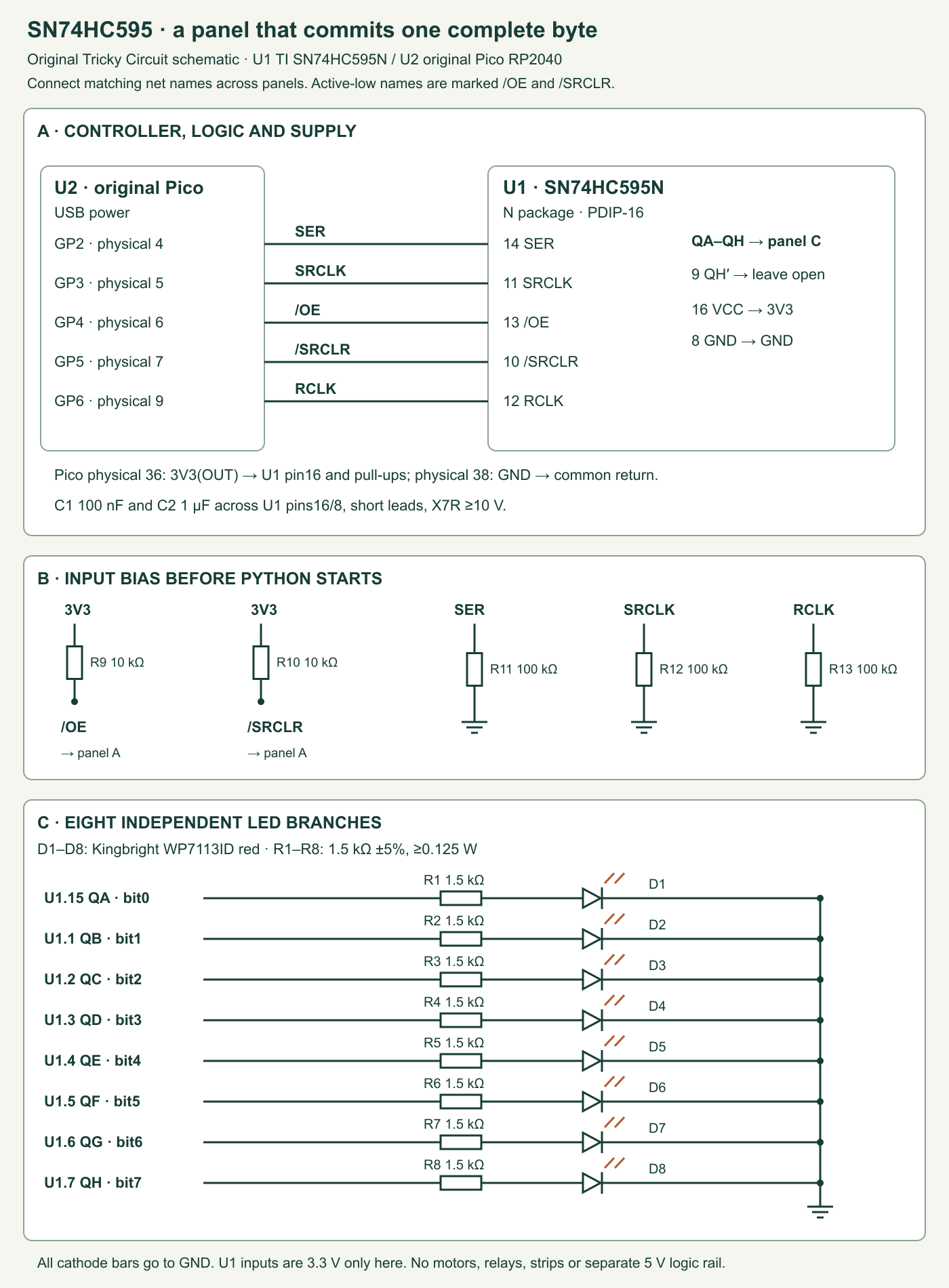
Put U1 across the breadboard’s centre gap. In the top view, with the package notch at the top, pin 1 is at the upper left. Count down to pin 8, cross to pin 9 at the lower right, then count upward to pin 16. This is different from looking at the underside of a part. Disconnect USB while wiring, and verify the actual chip marking and notch.
| U1 pin / TI name | Connection | Job |
|---|---|---|
| 16 VCC | Pico 3V3(OUT), physical pin 36 | 3.3 V supply; not pin 37, the regulator-enable input. |
| 8 GND | Pico GND, physical pin 38 | Common ground and all LED returns. |
| 14 SER | GP2, physical pin 4; R11 100 kΩ to GND | Serial data input. |
| 11 SRCLK | GP3, physical pin 5; R12 100 kΩ to GND | Shift on a rising edge. |
| 13 OE | GP4, physical pin 6; R9 10 kΩ to 3.3 V | High blanks; low enables parallel outputs. |
| 10 SRCLR | GP5, physical pin 7; R10 10 kΩ to 3.3 V | Low clears the shift bank, leaving storage unchanged. |
| 12 RCLK | GP6, physical pin 9; R13 100 kΩ to GND | Rising edge copies staging into storage. |
| 15 QA; 1 QB; 2 QC; 3 QD | R1–R4 → D1–D4 anodes; cathodes → GND | Bits 0–3 of the committed pattern. |
| 4 QE; 5 QF; 6 QG; 7 QH | R5–R8 → D5–D8 anodes; cathodes → GND | Bits 4–7 of the committed pattern. |
| 9 QH′ | Leave unconnected | Serial cascade output; this single-chip lesson does not use it. |
C1 and C2 connect between VCC and GND near U1. These ceramic capacitors have no polarity. The LED symbol’s bar identifies the cathode, which goes to ground. Check the WP7113ID package drawing if the leads have been trimmed. There are no unused input pins: all five control inputs have explicit bias and a controller connection. QH′ is an unused output, so leaving it open is appropriate; do not tie it to a supply rail.
GPIO means general-purpose input/output: a configurable digital controller pin. The GPIOs drive U1’s logic inputs, not the eight LED currents. The LED currents come through U1 from the 3.3 V supply. Do not power U1 at 5 V while retaining these direct 3.3 V control connections. Different families such as HCT, AHC, HCS or a differently suffixed 595 need their own supply, input, timing and package review; a similar number does not establish a drop-in replacement.
Check logic levels and current separately
The reviewed data sheet is SCLS041J, revision J, October 2021, linked from TI’s current product page on October 19, 2026. The exact SN74HC595N remains an active PDIP orderable part. No separate device errata was located in the reviewed product-document list and targeted official-source search. This records the review, not a promise that no clarification can ever appear.
The HC data sheet tabulates input thresholds at 2, 4.5 and 6 V. TI’s April 2026 SBAA808 interpolation example uses this exact chip and gives, at 3.3 V, an interpolated minimum high input of 2.358 V and maximum low input of 0.942 V. The RP2040’s 3.3 V GPIO table specifies a minimum output high of 2.62 V and maximum low of 0.5 V under its stated drive/load conditions. Those leave nominal comparison margins of 0.262 V high and 0.442 V low. These comparisons assume the shared 3.3 V rail and specified conditions; they are not an allowance for a 5 V chip supply or long noisy wiring.
A 10 kΩ pull-up draws about 0.33 mA when its GPIO drives low; a 100 kΩ pull-down draws about 0.033 mA when driven high. The normal controller loads therefore remain small. Slow deliberate bit timing is different from a slow electrical edge: the HC clock input still needs a clean transition. Do not add a large capacitor to either clock to make the demonstration slower. The program inserts time between clean edges instead.
For an LED branch, Ohm’s law gives current I = voltage across its resistor divided by resistance. If an illustrative red LED drop is 1.8 V and the output is near 3.3 V, a 1.5 kΩ resistor gives roughly 1 mA. That LED voltage is an example, not a guaranteed value at this current. A useful conservative current ceiling ignores the LED drop entirely:
Minimum resistor = 1500 × 0.95 = 1425 Ω
Resistor-only ceiling at 3.3 V = 3.3 / 1425 = 2.316 mA per branch
Eight branches = 18.53 mA
Resistor power ceiling = 3.3² / 1425 = 7.65 mW
The real LED current is lower because both the LED and output transistor lose voltage. The data sheet’s ±35 mA per-output and ±70 mA supply/ground figures are absolute maximum stress limits, not working current targets. Its advertised 6 mA drive condition is associated with higher-voltage test rows and must not be copied as a guaranteed 3.3 V output-high value. Our low-current red indicators do not feed another logic input; measure brightness and loaded output voltage in the all-on test, and retain the large current margin. This is not an LED-strip or relay driver. Each LED gets its own resistor even when several outputs are on together.
Complete program: stage first, commit once
The code deliberately uses bit banging, meaning software explicitly sets the data and clock pins, so individual shifts can be slowed for observation. It sends the most significant bit first: bit 7 goes first and bit 0 last. Because the newest bit enters QA, after eight clocks QA contains bit 0 and QH contains bit 7. Hexadecimal is base-16 notation, using digits 0–9 and A–F; 0xA5 means binary 10100101, and 0x3C means 00111100.
The Panel constructor configures OE high before the other signals, then calls initialize(). Initialization clears the shift register, shifts eight zeros, commits once and finally enables outputs. stage() shifts a complete new byte while RCLK remains low. commit() permits one storage-clock pulse only after a complete stage or a documented clear. clear_staging() prepares a known zero byte by SRCLR without committing it. Blanking through set_visible(False) preserves both banks.
"""Original Pico RP2040 + TI SN74HC595N, MicroPython v1.26.0.

A tabletop LED experiment, not a safety controller. Importing touches no pins.
Output blanking is best effort if a pin operation itself is broken.
"""
PIN_MAP = {'SER': 2, 'SRCLK': 3, 'OE': 4, 'SRCLR': 5, 'RCLK': 6}
DEMO = 'staged'  # 'staged', 'wrong-latch', 'clear', or 'blank'


class Panel:
    def __init__(self, machine_module=None, clock=None):
        if machine_module is None:
            import machine as machine_module
        if clock is None:
            import time as clock
        self.clock = clock
        self.ready = False
        self.pending = False
        # First GPIO operation keeps OE HIGH. The external 10k pull-up acts
        # before Python starts; firmware alone cannot provide that bias.
        self.oe = machine_module.Pin(PIN_MAP['OE'], machine_module.Pin.OUT, value=1)
        try:
            self.ser = machine_module.Pin(PIN_MAP['SER'], machine_module.Pin.OUT, value=0)
            self.srclk = machine_module.Pin(PIN_MAP['SRCLK'], machine_module.Pin.OUT, value=0)
            self.rclk = machine_module.Pin(PIN_MAP['RCLK'], machine_module.Pin.OUT, value=0)
            self.srclr = machine_module.Pin(PIN_MAP['SRCLR'], machine_module.Pin.OUT, value=1)
            self.initialize()
        except BaseException:
            self._abort()
            raise

    def _abort(self):
        self.ready = False
        self.pending = False
        try:
            self.oe.value(1)
        except BaseException:
            pass  # Cannot guarantee electrical blanking if OE control fails.

    def _require_ready(self):
        if not self.ready:
            self._abort()
            raise RuntimeError('Initialize the panel before using it')

    def _validate(self, value, delay_ms=0):
        if type(value) is not int or not 0 <= value <= 255:
            self._abort()
            raise ValueError('Pattern must be an integer from 0 to 255')
        if type(delay_ms) is not int or not 0 <= delay_ms <= 1000:
            self._abort()
            raise ValueError('Bit delay must be an integer from 0 to 1000 ms')

    def _pulse_latch(self):
        self.rclk.value(0)
        self.clock.sleep_us(5)
        self.rclk.value(1)
        self.clock.sleep_us(5)
        self.rclk.value(0)
        self.clock.sleep_us(5)

    def _shift8(self, value, delay_ms=0, latch_each=False):
        self.rclk.value(0)
        self.srclk.value(0)
        for bit in range(7, -1, -1):
            self.ser.value((value >> bit) & 1)
            self.clock.sleep_us(5)
            self.srclk.value(1)
            self.clock.sleep_us(5)
            self.srclk.value(0)
            self.clock.sleep_us(5)
            if latch_each:
                self._pulse_latch()  # Deliberately wrong experiment only.
            if delay_ms:
                self.clock.sleep_ms(delay_ms)

    def initialize(self):
        self.ready = False
        self.pending = False
        try:
            self.oe.value(1)
            self.ser.value(0)
            self.srclk.value(0)
            self.rclk.value(0)
            self.srclr.value(0)
            self.clock.sleep_us(10)
            self.srclr.value(1)
            self.clock.sleep_us(10)
            self._shift8(0)
            self._pulse_latch()  # Known zeros reach storage before OE goes LOW.
            self.oe.value(0)
            self.ready = True
        except BaseException:
            self._abort()
            raise

    def stage(self, value, bit_delay_ms=0):
        """Shift a complete new byte while the previously latched panel stays."""
        self._require_ready()
        self._validate(value, bit_delay_ms)
        self.pending = False
        try:
            self._shift8(value, bit_delay_ms)
            self.pending = True
        except BaseException:
            self._abort()
            raise

    def commit(self):
        self._require_ready()
        if not self.pending:
            self._abort()
            raise RuntimeError('No complete staged byte or cleared staging register')
        try:
            self._pulse_latch()
            self.pending = False
        except BaseException:
            self._abort()
            raise

    def write(self, value):
        self.stage(value)
        self.commit()

    def clear_staging(self):
        """SRCLR clears only the shift register; visible storage is unchanged."""
        self._require_ready()
        self.pending = False
        try:
            self.srclk.value(0)
            self.rclk.value(0)
            self.srclr.value(0)
            self.clock.sleep_us(10)
            self.srclr.value(1)
            self.clock.sleep_us(10)
            self.pending = True  # Documented clear established eight zero bits.
        except BaseException:
            self._abort()
            raise

    def set_visible(self, enabled):
        self._require_ready()
        if type(enabled) is not bool:
            self._abort()
            raise ValueError('Visibility must be True or False')
        try:
            self.oe.value(0 if enabled else 1)
        except BaseException:
            self._abort()
            raise

    def demonstrate_wrong_latch(self, value, bit_delay_ms=400):
        """Expose intermediate patterns by intentionally latching after each bit."""
        self._require_ready()
        self._validate(value, bit_delay_ms)
        self.pending = False
        try:
            self._shift8(value, bit_delay_ms, latch_each=True)
        except BaseException:
            self._abort()
            raise

    def close(self):
        self._abort()  # Blanked; initialize() is required before reuse.


def run(mode=DEMO, machine_module=None, clock=None):
    if mode not in ('staged', 'wrong-latch', 'clear', 'blank'):
        raise ValueError('Unknown demonstration mode')
    if clock is None:
        import time as clock
    panel = None
    try:
        panel = Panel(machine_module, clock)
        panel.write(0xA5)
        clock.sleep_ms(1500)
        if mode == 'staged':
            panel.stage(0x3C, bit_delay_ms=400)
            clock.sleep_ms(1500)
            panel.commit()
        elif mode == 'wrong-latch':
            panel.demonstrate_wrong_latch(0x3C)
        elif mode == 'clear':
            panel.clear_staging()
            clock.sleep_ms(1500)
            panel.commit()
        else:
            panel.set_visible(False)
            clock.sleep_ms(1500)
            panel.set_visible(True)
        clock.sleep_ms(1500)
    finally:
        if panel is not None:
            panel.close()


if __name__ == '__main__':
    run()
Use the official RPI_PICO download archive to select v1.26.0, and verify the interpreter banner on the original board. Save the program as latched_panel.py while learning. At the interactive REPL—the read–evaluate–print loop—run import latched_panel; latched_panel.run('staged'). Each demonstration runs once and blanks the outputs when finished. Saving it as main.py later makes the selected DEMO run at startup.
The requested 5 µs pauses give deliberately generous separation compared with the data sheet’s nanosecond timing requirements. A microsecond, µs, is one millionth of a second. MicroPython execution adds overhead, and the clock edges have not been measured here. These delays do not establish a certified transfer rate, propagation delay or electrical edge quality. Use a logic analyser or oscilloscope if investigating those quantities.
Any caught transfer exception, including Ctrl-C, invalidates pending data, attempts to blank OE and requires explicit initialize() before reuse. A second commit without a new stage is also rejected and blanked. Cleanup is best effort: software cannot guarantee blanking if the OE wire or GPIO operation has failed. Nor is there an acknowledgement wire proving that a physical register received the bits. The program prevents certain operation-order mistakes; it cannot diagnose a disconnected latch wire from pin writes alone.
Four short experiments with different observations
- Stable old panel during new shifts. Check wiring with USB disconnected, reconnect and run
run('staged'). First expect0xA5: QA, QC, QF and QH on. The next eight shifts are separated by 400 ms, so transfer takes at least 3.2 seconds. The old pattern should stay visible throughout, including the additional 1.5-second pause after the last shift. One later RCLK edge changes the panel to0x3C: QC, QD, QE and QF on. The final 1.5-second hold ends with blanking. - Make the update mistake visible. Run
run('wrong-latch'). It starts with the same pattern but intentionally pulses RCLK after every incoming bit. Intermediate bytes become visible. The final byte is still0x3C, showing why checking only the final state misses the display-quality fault. This mode is an intentional teaching error, not the normal update path. - Clear staging without clearing storage. Run
run('clear'). After0xA5appears, SRCLR clears the shift bank. The same LEDs should remain lit through the 1.5-second pause because storage has not been updated. The later commit copies zeros and turns them off. This is the direct experiment behind the warning that MR/SRCLR does not reset storage. - Blanking preserves a pattern. Run
run('blank'). After the first pattern, OE goes high and the LEDs go dark. Bringing OE low shows the same stored pattern again. No new bits are shifted during that pause. Darkness alone therefore does not tell you whether storage contains zeros or whether the outputs are disabled.
Before experimenting with startup, leave the eight resistor-limited LEDs as the only output loads. Run from machine import Pin; Pin(4, Pin.IN, pull=None) after the demonstration has finished: the external OE pull-up should keep the panel blank while GP4 is an input. Do not interpret one clean startup as proof for every supply ramp. For the all-on current check, create p = latched_panel.Panel(), call p.write(0xFF), measure the 3.3 V rail and each resistor’s voltage, then call p.close(). Calculate each actual branch current from its resistor voltage.
If an oscilloscope or logic analyser is available, record SER, SRCLK and RCLK with a common ground. In normal staging, look for eight shift rising edges followed later by one storage rising edge. In the wrong-latch mode, count eight storage edges. A long software pause allows a person to see the distinction but does not prove nanosecond timing compliance. Record actual observations separately from the expected patterns and host-model results.
What failures should look like
| Observation | Check |
|---|---|
| No LEDs, even after commit | OE level, common ground, LED polarity, actual VCC and whether SRCLR is held low. |
| Correct-looking final byte but flashes while shifting | RCLK is being pulsed too often, tied to SRCLK or disturbed by wiring. |
| Pattern reversed across QA–QH | Bit order or physical LED numbering; compare 0x01 and 0x80 one at a time. |
| Old LEDs remain after SRCLR | Expected until RCLK commits the cleared bank; do not replace the chip for this behavior. |
| Random result after interrupting a transfer | Call initialize before reuse; verify external OE bias and both clock idle levels. |
| Dim or uneven all-on panel | Measure the loaded rail/output and actual resistors; do not fix it by removing current limiting. |
Keep grounds and bypass capacitors local, and route clocks away from long LED return loops. Repeated clock edges from a noisy wire can create a correct software trace but an incorrect physical state. Avoid touching live input pins as a “test”; intentionally selected demo modes are more reproducible. The Tricky Circuit learning course provides the wider foundations for voltage, current and digital signals.
What the host tests establish
The validator imports this exact program and attaches a clocked eight-bit logic model to its actual pin writes. The model starts with unknown register contents and OE released high. It checks initialization order, bit placement for all 256 byte values, no storage changes during ordinary staging, one-shot commits, deliberate per-bit latch artifacts, independent clear/blank operations, input validation and injected transfer/interruption cleanup. End-to-end tests execute all four supplied demo paths. This validates state transitions and software decisions under an ideal model; it does not model output resistance, threshold uncertainty, capacitance, power ramps or physical clock noise.
Challenge: after a successful stage, which operation changes the LEDs?
Start with stored 0xA5, stage 0x3C, blank OE high, then clear SRCLR and release it. What appears when OE goes low? What appears after the next RCLK rising edge?
The first operation shows 0xA5 again: storage survived both blanking and the shift clear. The next RCLK edge transfers the now-zero shift bank, so the panel turns off. The staged 0x3C was discarded by clearing the shift register. A new byte must be staged if that is the pattern you want to commit. This is why output enable, shift clear and storage commit must remain separate concepts.
Primary sources
- TI exact SN74HC595N orderable part and product documentation.
- TI SNx4HC595 data sheet SCLS041J: N-package top view, truth table, separate shift/storage clocks and operating/electrical limits.
- TI SBAA808, April 2026: the exact 3.3 V input-threshold interpolation example.
- TI SCHA005B, December 2022: clocked-device startup behavior.
- MicroPython v1.26.0 Pin API and RP2 quick reference.
- Original Pico board data sheet and RP2040 data sheet, GPIO characteristics.
- Kingbright WP7113ID specification: polarity and device identity.
Download the experiment sources (ZIP): complete programs, full-size PNG and editable SVG diagrams, and blank worksheets where supplied. The complete article program remains inline above.